
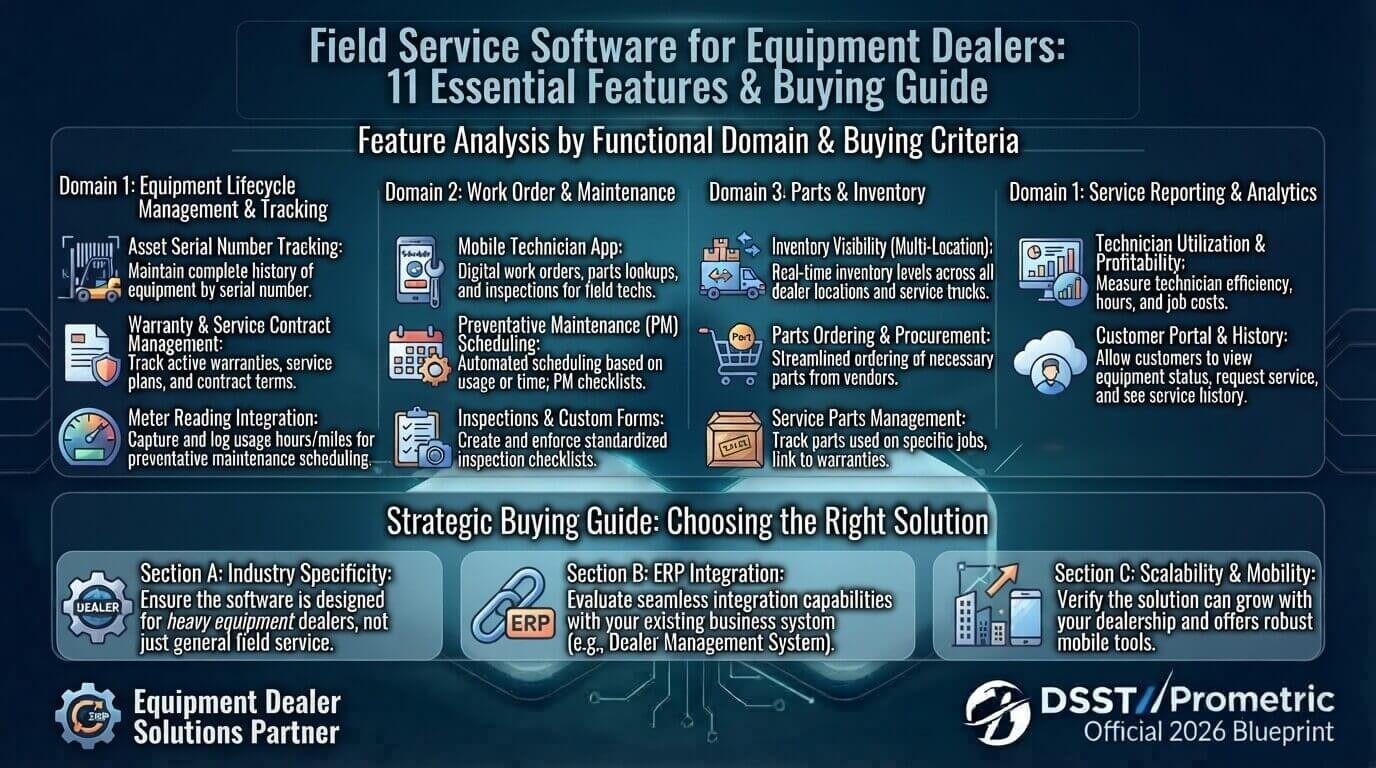
Equipment dealers do more than sell machines. They also handle installations, inspections, repairs, preventive maintenance, warranty claims, replacement parts, technician visits, and long-term service contracts.
That makes service management more complicated than simply assigning a technician to a job.
Field service software for equipment dealers helps connect customers, equipment, serial numbers, service history, parts, warranties, technicians, work orders, and billing in one workflow.
The right system can help a dealer reduce administrative work, improve technician coordination, maintain accurate equipment records, and provide better visibility into ongoing service operations.
This guide explains the most important features to look for, how equipment-focused field service software differs from generic solutions, what integrations matter, and what questions to ask before buying.
What Is Field Service Software for Equipment Dealers?
Field service software for equipment dealers is a technology platform designed to manage service activities for equipment sold, rented, installed, or maintained by a dealer.
Instead of keeping equipment information in spreadsheets, customer details in a CRM, parts in an inventory system, and technician schedules somewhere else, field service software can bring these workflows together.
A typical equipment service record may include:
- Customer information
- Equipment model
- Serial number
- Installation date
- Equipment location
- Warranty status
- Service history
- Previous repairs
- Parts used
- Technician notes
- Maintenance schedule
- Service contract
- Labor and billing information
Modern field service platforms commonly connect work orders with customer assets, scheduling, mobile technicians, inventory, maintenance, and billing.
For equipment dealers, this asset-centered approach is particularly useful because one customer may have multiple machines, each with its own service history and maintenance requirements.
Why Equipment Dealers Need Specialized Field Service Software
A generic field service platform may handle basic scheduling and work orders, but equipment dealers often need deeper equipment-level information.
For example, imagine a customer owns:
- Three excavators
- Two generators
- Four forklifts
- One air compressor
A service manager needs to know exactly which machine requires attention.
A simple customer record is not enough.
The system should help staff answer questions such as:
- Which equipment needs service?
- What is the serial number?
- When was it installed?
- Is it still under warranty?
- What repairs were completed previously?
- Which parts were replaced?
- Which technician worked on it?
- When is the next maintenance visit?
- Does the customer have an active service contract?
This is why equipment dealers should evaluate software based on the complete service lifecycle, not just scheduling features.
How Field Service Software Works for Equipment Dealers
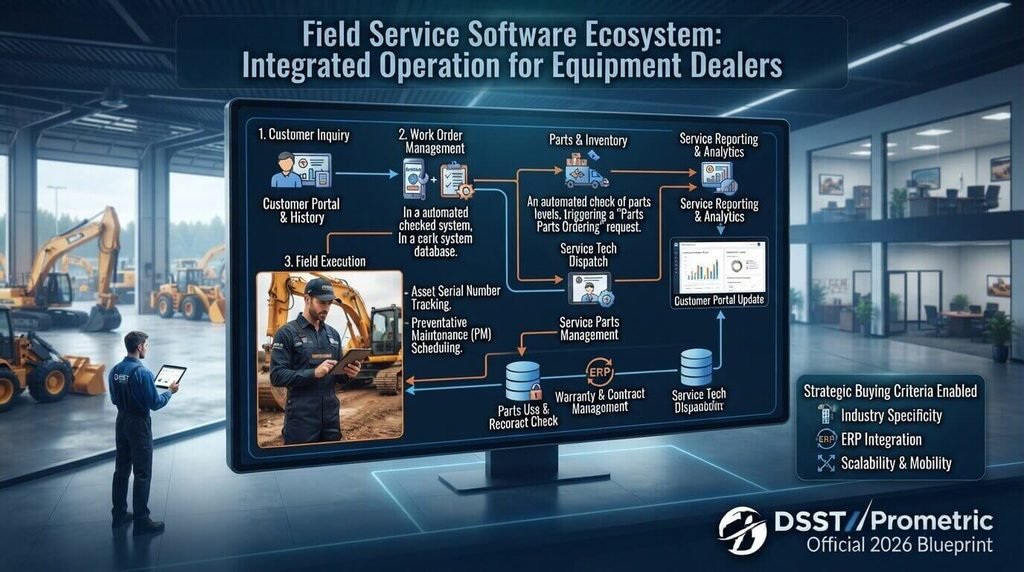
A typical workflow can look like this:
Customer request → Equipment identification → Work order → Technician scheduling → Parts preparation → Field service → Service documentation → Billing → Service history → Next maintenance
For example, a customer may report that a construction machine is overheating.
The service team can identify the customer’s equipment record, review its previous service history, create a work order, assign a technician, check required parts, complete the repair, record the work performed, and update the equipment’s service history.
Microsoft’s Field Service documentation describes work orders as records used to coordinate and schedule service activities, including repairs and preventive maintenance.
Example: A Construction Equipment Repair
Suppose a customer reports that an excavator is losing hydraulic pressure.
Instead of starting with a blank service ticket, the service manager can look up:
- Customer
- Excavator model
- Serial number
- Previous hydraulic repairs
- Warranty status
- Previous parts used
- Technician notes
- Upcoming maintenance
The dispatcher can then create a work order and assign an appropriately qualified technician.
The technician receives the job through the mobile system, records the diagnosis, uses the required parts, completes the repair, and updates the service record.
That creates a complete history for the machine.
11 Essential Features of Field Service Software for Equipment Dealers
1. Equipment and Serial Number Tracking
Serial-number tracking should be one of the first features equipment dealers evaluate.
Each individual machine should have its own record rather than being treated simply as a product category.
For example:
Product: Excavator Model X200
Serial Number: EXC-2026-00452
Customer: ABC Construction
Location: Dallas, Texas
Installation: March 2026
Warranty: Active
Last Service: August 2026
This makes it easier to identify the exact machine that requires service.
Salesforce’s official documentation describes customer assets as specific products purchased by customers and notes that asset records can contain information such as serial numbers, purchase dates, warranties, and other details.
2. Complete Equipment Service History
Equipment service history is another critical feature.
A useful system should show previous:
- Repairs
- Inspections
- Maintenance visits
- Parts replacements
- Warranty claims
- Technician notes
- Labor
- Service dates
- Equipment problems
This helps technicians understand what has already happened before starting a new job.
It can also help service managers identify recurring problems.
A complete asset history can include maintenance and service information associated with the individual equipment record.
Salesforce Trailhead: Track Customer Assets
3. Scheduling and Technician Dispatch
Equipment dealers may have technicians working across a large geographic area.
Scheduling software should help dispatchers consider:
- Technician availability
- Location
- Skills
- Job urgency
- Equipment type
- Estimated job duration
- Customer availability
The goal is not simply to find an empty calendar slot.
The system should help assign the right technician to the right equipment at the right time.
Microsoft’s Field Service platform includes scheduling and dispatch capabilities for assigning resources to service work.
4. Mobile Field Service Access
Technicians should not have to depend on office staff for every piece of information.
A mobile application can give technicians access to:
- Work orders
- Equipment information
- Service history
- Customer details
- Parts information
- Checklists
- Service instructions
- Job status
- Notes
- Photos
- Signatures
This is particularly important when technicians work at construction sites, factories, warehouses, farms, or remote locations.
Microsoft’s documentation describes mobile access for frontline workers and includes support for viewing and updating scheduled work orders.
Microsoft Learn: Dynamics 365 Field Service Documentation
5. Parts and Inventory Management
Equipment service often depends on parts availability.
A technician may arrive at a job and discover that the required filter, pump, belt, sensor, valve, or replacement component is unavailable.
That can create another visit and increase downtime.
Good field service software should connect service work with parts information.
Look for capabilities such as:
- Parts availability
- Warehouse inventory
- Technician truck stock
- Parts reservations
- Parts consumption
- Transfers
- Returns
- Reordering
If you want to understand the broader role of inventory technology, see our guide to inventory management software.
Salesforce documentation also describes field service inventory features for tracking storage, requests, transfers, consumption, serialized inventory, and returns.
Salesforce: Set Up Field Service Inventory
6. Warranty Management
Warranty information can become difficult to manage when dealers have hundreds or thousands of pieces of equipment in the field.
A useful system should make it easy to determine:
- Whether the equipment is under warranty
- When the warranty expires
- What components are covered
- Which repairs qualify
- Which costs should be billed
- Which claims have already been submitted
This can reduce unnecessary billing errors and help service teams handle warranty-related work more consistently.
Equipment asset systems can store warranty terms alongside individual asset records.
7. Preventive Maintenance Scheduling
Waiting until equipment breaks down can lead to expensive downtime.
Preventive maintenance allows dealers to schedule service before a major failure occurs.
Depending on the equipment, maintenance may be based on:
- Date
- Operating hours
- Mileage
- Usage
- Equipment condition
- Manufacturer recommendations
- Service agreements
Modern field service systems can automatically generate recurring maintenance appointments for equipment.
For example:
Every 500 operating hours → inspection
Every 1,000 hours → major maintenance
Every 12 months → scheduled service
8. Work Orders and Service Requests
Work orders are the operational center of many field service workflows.
A work order should contain enough information for a technician to understand what needs to be done.
Depending on the system, it may include:
- Customer
- Equipment
- Service location
- Problem description
- Required parts
- Required services
- Technician
- Schedule
- Labor
- Photos
- Notes
- Completion status
Microsoft explains that work orders can be used for repairs, installations, and preventive maintenance and can contain tasks, products, and services.
Microsoft Learn: Create a Work Order
9. Service Contracts and Recurring Visits
Many equipment dealers provide ongoing maintenance agreements.
For example:
12-month service agreement
- Quarterly inspection
- Annual preventive maintenance
- Priority response
- Labor coverage
- Selected parts coverage
Instead of manually creating every future visit, software can automate recurring service workflows.
Microsoft’s Field Service documentation supports agreements that can automatically generate recurring work orders.
This can help service departments manage contract obligations more consistently.
10. Invoicing and Billing
After completing a service visit, the dealer may need to bill for:
- Labor
- Parts
- Travel
- Emergency service
- Additional work
- Non-warranty repairs
Connecting field service activity with billing reduces the need for employees to re-enter information manually.
A strong system should clearly distinguish between warranty work, contract-covered work, and billable work.
Microsoft’s Field Service overview includes billing capabilities based on products and services delivered to customers.
11. Reporting and Service Analytics
Data becomes valuable when it helps managers make better operational decisions.
Useful reports may include:
- First-time fix rate
- Average response time
- Average repair time
- Technician utilization
- Repeat service calls
- Parts consumption
- Warranty costs
- Revenue per technician
- Open work orders
- Equipment downtime
- Preventive maintenance completion
For example, if one equipment model repeatedly requires the same repair, the dealer may investigate whether there is a recurring component or maintenance issue.
Field service platforms can provide analytics around work orders, scheduling, customers, and service activity.
Generic Field Service Software vs. Equipment Dealer Software
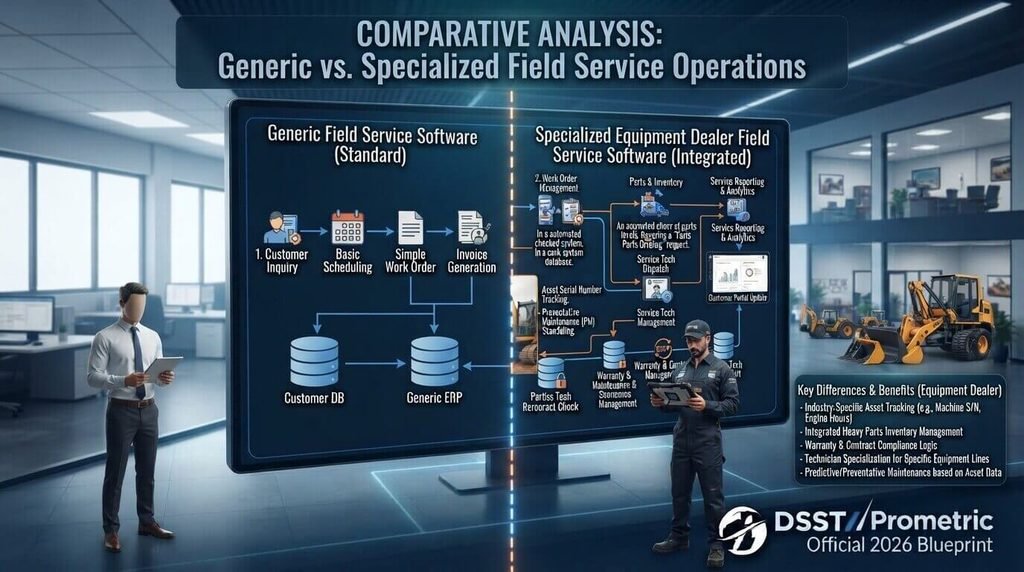
Not every field service platform is designed around equipment.
| Area | Generic Field Service Software | Equipment Dealer Software |
|---|---|---|
| Customer management | Yes | Yes |
| Work orders | Yes | Yes |
| Technician scheduling | Yes | Yes |
| Mobile access | Usually | Usually |
| Equipment records | Basic to advanced | Equipment-focused |
| Serial-number tracking | Varies | Important |
| Equipment service history | Varies | Essential |
| Warranty management | Varies | Important |
| Parts management | Varies | Highly important |
| Preventive maintenance | Usually | Essential |
| Service contracts | Usually | Important |
| Equipment lifecycle | Limited in some systems | Strong focus |
| Dealer/ERP integration | Varies | Often important |
The important point is that feature count is not everything.
A platform can have dozens of features but still be a poor fit if its equipment, parts, warranty, and service workflows do not match how the dealer actually operates.
How to Choose Field Service Software for Equipment Dealers
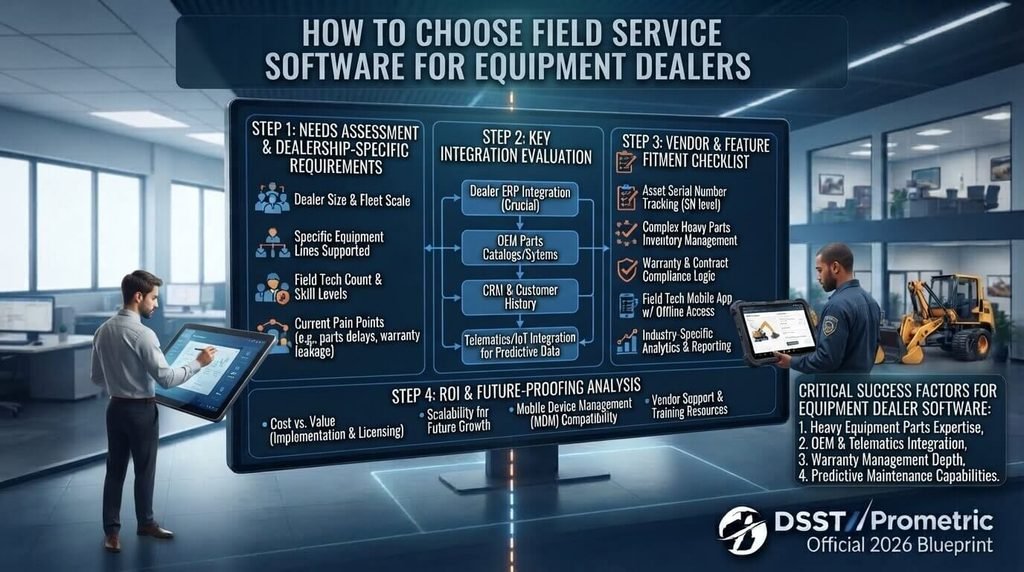
Before choosing a platform, map your current service process.
Start with:
Customer → Equipment → Serial Number → Service Request → Work Order → Technician → Parts → Repair → Billing → Service History → Next Maintenance
Then ask vendors to demonstrate that exact workflow.
Use a Realistic Demo Scenario
Do not ask a vendor to show only a dashboard.
Give the vendor a realistic example:
A customer reports a hydraulic problem with an excavator. The machine is under warranty. The technician needs two parts from the warehouse. The repair requires a qualified technician. After completion, the customer needs a service report and the system must update the machine’s service history.
Then ask the vendor to demonstrate the complete process.
This can reveal gaps that are difficult to identify from a feature list.
Field Service Software Integration With CRM, ERP and Inventory
Integration is especially important for equipment dealers.
Your field service system may need to exchange information with:
- CRM
- ERP
- Accounting software
- Inventory management
- Purchasing
- Customer portals
- Ecommerce
- GPS or mapping
- IoT platforms
For example, customer information may originate in a CRM, while parts information comes from an ERP or inventory system.
If these systems cannot communicate properly, employees may have to enter the same information multiple times.
For small businesses evaluating broader business systems, our guide to ERP software for small businesses provides additional context.
Before buying, ask:
- Does the platform offer APIs?
- Does it support your ERP?
- Can it synchronize customer records?
- Can it exchange inventory data?
- Can it connect service invoices with accounting?
- How are integration errors handled?
- Is integration included in the subscription?
- Are there additional implementation costs?
Cloud vs. On-Premise Field Service Software
Another decision is whether to use cloud-based or on-premise software.
Cloud-Based Software
Cloud platforms generally allow users to access the system through internet-connected devices.
Potential advantages include:
- Easier remote access
- Centralized updates
- Reduced local infrastructure
- Easier access for distributed teams
- Scalability
Our guide to cloud computing explains the broader role of cloud technology in modern business systems.
On-Premise Software
On-premise software is installed and managed within the organization’s own infrastructure.
It may be considered when a company has:
- Specific infrastructure requirements
- Internal IT resources
- Data-control requirements
- Existing legacy systems
- Custom deployment needs
The decision should be based on the dealer’s operational requirements rather than simply choosing whichever model is more popular.
How Much Does Field Service Software for Equipment Dealers Cost?
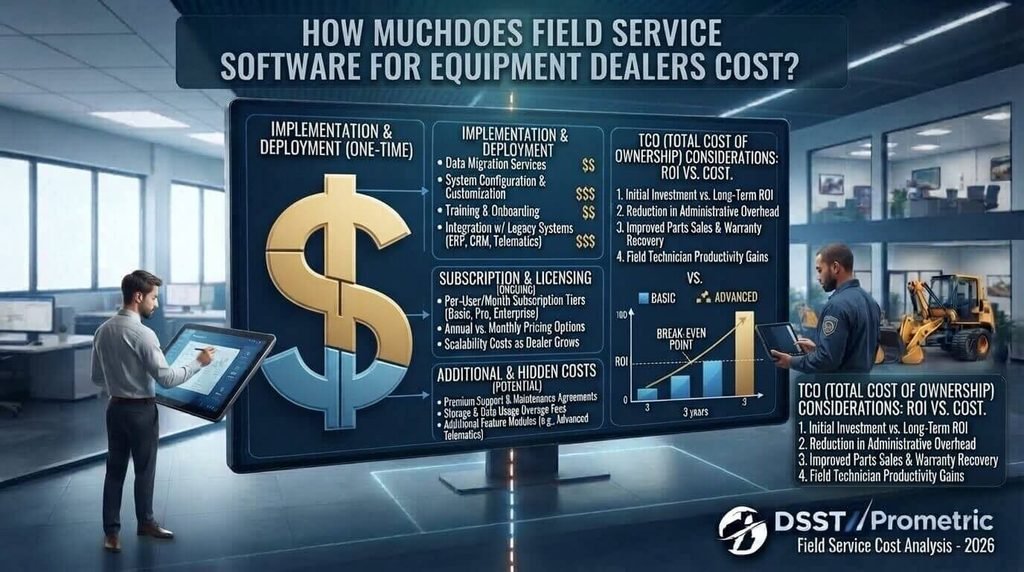
Pricing can vary significantly.
Some vendors charge per user, while others use different pricing models based on technicians, features, service volume, modules, or implementation requirements.
Potential costs include:
- Software subscription
- User licenses
- Mobile applications
- Implementation
- Data migration
- Integration
- Training
- Customization
- Support
- Hardware
- Additional modules
When comparing prices, calculate the total cost of ownership, not only the monthly subscription.
A cheaper platform can become expensive if it requires extensive customization or manual work.
Common Implementation Mistakes to Avoid
Starting With Dirty Equipment Data
If equipment records are incomplete or duplicated, the new system may simply make the existing data problems easier to see.
Clean:
- Customer records
- Serial numbers
- Equipment models
- Locations
- Warranty dates
- Service history
- Parts records
before migration whenever possible.
Choosing Software Without Technician Input
Technicians use the system differently from office staff.
Ask technicians:
- What information do you need in the field?
- What slows you down?
- How do you currently document repairs?
- What parts information do you need?
- What should the mobile application make easier?
Ignoring Parts Workflows
A field service system that schedules technicians perfectly but cannot support parts workflows may still create operational problems.
Parts availability should be tested during the software evaluation.
Failing to Test Mobile Workflows
Do not evaluate mobile functionality only through screenshots.
Ask a technician to complete a realistic job:
- Open work order.
- Review equipment history.
- Check required parts.
- Add notes.
- Record labor.
- Add photos.
- Complete the job.
- Submit the service report.
Ignoring Integrations
If your CRM, ERP, accounting, or inventory system is important to your business, test the integration before signing a contract.
Training Only Office Employees
Technicians, dispatchers, service managers, parts employees, and billing staff may all interact with the system.
Training should reflect each role’s actual workflow.
A broader digital transformation strategy can also help organizations approach technology implementation as a business process change rather than simply a software installation.
Real-World Examples
Example 1: Emergency Equipment Breakdown
A customer reports that a loader has stopped working.
The service team:
- Finds the customer.
- Identifies the equipment by serial number.
- Reviews service history.
- Checks warranty status.
- Creates a work order.
- Checks required parts.
- Assigns a technician.
- Completes the repair.
- Records parts and labor.
- Updates service history.
This creates a connected record from the initial service request to completion.
Example 2: Preventive Maintenance
A generator reaches its scheduled maintenance interval.
The system creates or schedules the maintenance work.
The technician receives:
- Equipment details
- Maintenance checklist
- Previous service information
- Required parts
- Service instructions
After completion, the maintenance record is updated and the next service interval can be scheduled.
Example 3: Warranty Repair
A customer reports a failed component.
The service team checks the equipment record and sees that the warranty is still active.
The work can then be classified appropriately so the dealer can track warranty-related costs and documentation.
Example 4: Recurring Equipment Problem
A machine has required the same repair several times.
Because all service visits are connected to the equipment record, the service manager can review previous work and identify the recurring issue.
This is much harder when service information is spread across spreadsheets, emails, and disconnected systems.
Questions to Ask Before Buying
Before selecting field service software for equipment dealers, ask vendors:
- Can the system track individual equipment by serial number?
- Can each equipment record contain complete service history?
- Can equipment be linked to specific customers and locations?
- Can warranties be tracked?
- Can preventive maintenance be automated?
- Can the system manage recurring service agreements?
- Can technicians use the platform on mobile devices?
- Does the mobile app support offline work?
- Can technicians view equipment history in the field?
- Can technicians record photos and notes?
- Can the system manage parts inventory?
- Can technician truck stock be tracked?
- Can work orders include required parts?
- Can the platform integrate with our ERP?
- Can it integrate with our CRM?
- Can it connect with accounting software?
- Does it provide APIs?
- How does billing work?
- What are the implementation costs?
- What training and support are included?
Frequently Asked Questions
What is field service software for equipment dealers?
It is software used to manage customer equipment service operations, including work orders, technician scheduling, equipment records, parts, warranties, preventive maintenance, service history, and billing.
Why is serial-number tracking important?
Serial-number tracking lets a dealer connect service activity to the exact piece of equipment rather than only the product model.
Can field service software manage equipment warranties?
Many field service platforms can store warranty information and associate it with individual equipment or asset records. The exact workflow depends on the software.
Does field service software include inventory management?
Some platforms include inventory capabilities, while others integrate with dedicated inventory or ERP systems. Features can include parts availability, transfers, consumption, returns, and technician stock.
Can technicians use field service software on mobile devices?
Yes. Many modern field service platforms provide mobile applications so technicians can access and update work orders while working at customer locations.
Can it schedule preventive maintenance?
Many field service platforms support recurring maintenance workflows. Microsoft, for example, documents preventive maintenance and recurring work-order capabilities in Dynamics 365 Field Service.
Should equipment dealers choose a generic field service platform?
That depends on the dealer’s workflow. Dealers should compare how well each platform handles equipment records, serial numbers, warranties, parts, preventive maintenance, service contracts, and integrations.
Does field service software replace ERP software?
Not necessarily. Field service software may complement an ERP by managing service operations while the ERP handles broader financial, purchasing, inventory, or business processes.
What is the most important feature for an equipment dealer?
There is no single feature that fits every dealer. However, equipment-level records, service history, work orders, scheduling, parts management, preventive maintenance, and integrations are important areas to evaluate.
How should a dealer test software before buying?
Use a realistic service scenario involving an actual equipment type, serial number, warranty condition, required parts, technician assignment, repair, and billing workflow.
Final Thoughts
The right field service software for equipment dealers should connect the complete equipment service lifecycle.
Instead of treating service as a simple technician scheduling problem, evaluate the complete chain:
Customer → Equipment → Serial Number → Warranty → Work Order → Parts → Technician → Service → Billing → History → Next Maintenance
This approach helps equipment dealers evaluate software based on how their service department actually works.
The best evaluation process is not simply comparing feature lists. Build a realistic service scenario, involve technicians and service managers, test the mobile workflow, verify integrations, and calculate the total cost of ownership.
When the software connects equipment data, technicians, parts, maintenance, and customer service in one workflow, the dealer can create a more organized foundation for managing equipment throughout its service lifecycle.