
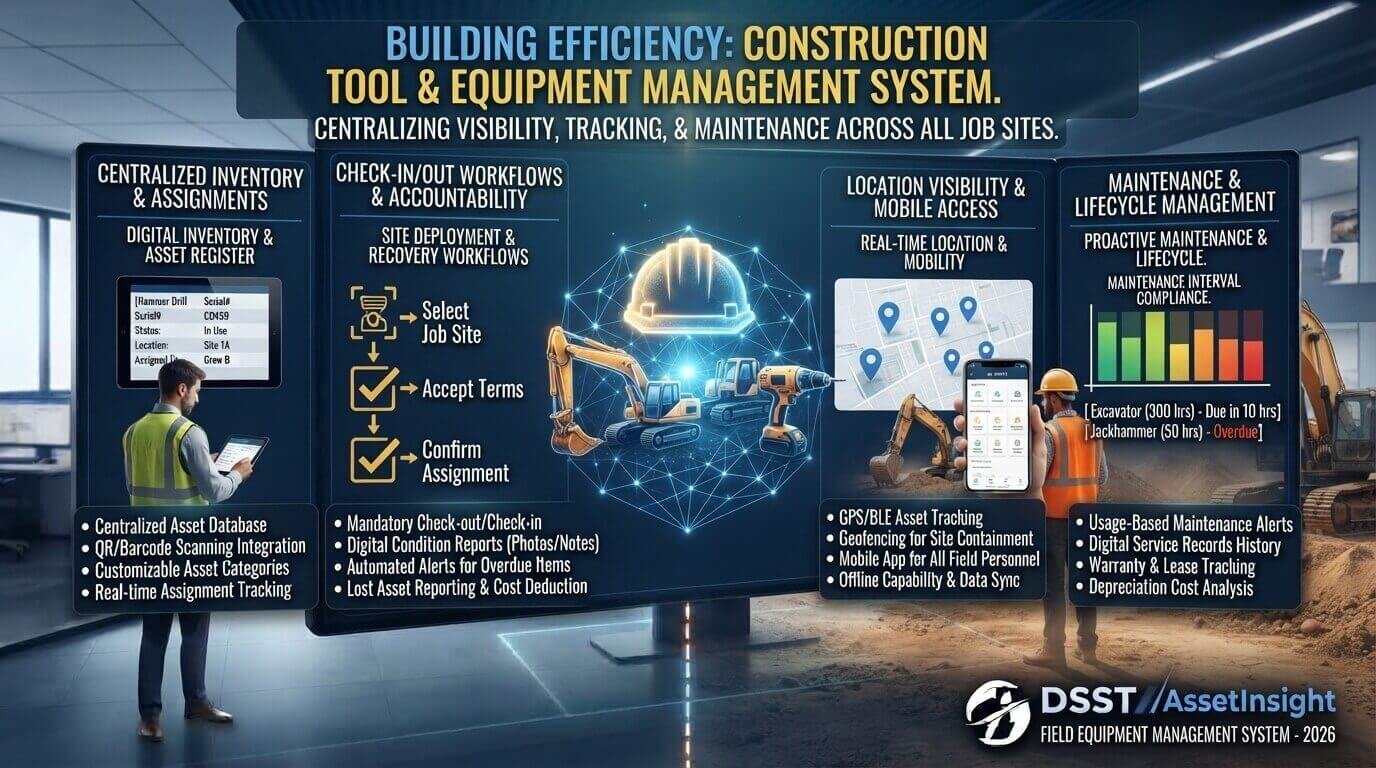
Construction projects depend on tools and equipment being available at the right place, at the right time, and in good working condition. When tools are misplaced, poorly maintained, or assigned without proper records, teams can lose valuable time and money.
Construction tool management provides a structured way to organize, track, assign, maintain, and monitor tools across construction sites, vehicles, warehouses, and crews. With the right process, construction businesses can improve visibility, reduce unnecessary purchases, and make it easier for workers to find the equipment they need.
This guide explains how construction tool management works, why it matters, which tracking methods are available, and how businesses can build a practical tool management system.
Quick Answer: What Is Construction Tool Management?
Construction tool management is the process of organizing, tracking, assigning, maintaining, and monitoring tools and equipment used by construction teams. It can involve spreadsheets, barcode or QR-code systems, mobile apps, asset management platforms, GPS trackers, or dedicated construction tool management software.
The goal is simple: know what tools you have, where they are, who is using them, what condition they are in, and when they need to be returned or maintained.
Why Is Construction Tool Management Important?
Construction teams often work across multiple projects, vehicles, storage areas, and job sites. Tools can move from a warehouse to a truck, from a truck to a job site, and then to another project.
Without a clear tracking process, it becomes difficult to answer basic questions:
- Where is a particular tool?
- Who currently has it?
- Is it available?
- When was it last used?
- Does it need maintenance?
- Was it returned to the correct location?
- Should the company repair, replace, rent, or purchase another tool?
A structured management system gives teams a central record of their assets.
Good construction tool management can also help managers identify underused equipment. Instead of purchasing another tool simply because the existing one cannot be located, a manager can check the current inventory and assignments first.
For businesses already investing in digital systems, understanding how to choose the right software for your business size can also help when deciding whether a dedicated tool management platform is necessary.
What Does a Construction Tool Management System Track?
A useful system should store more than the tool’s name. Each asset can have its own digital record containing important information.
Typical information includes:
| Information | Example |
|---|---|
| Tool name | Cordless Impact Driver |
| Asset ID | CT-1045 |
| Category | Power Tool |
| Brand | Example Brand |
| Model | Model XYZ |
| Current location | Manchester Job Site |
| Assigned to | Electrical Crew |
| Status | In Use |
| Purchase date | January 2026 |
| Condition | Good |
| Maintenance date | June 2026 |
| Next service | December 2026 |
| Replacement value | £350 |
| Tracking method | QR Code |
This information creates a reliable inventory record and makes it easier to manage equipment across different locations.
How Does Construction Tool Tracking Work?
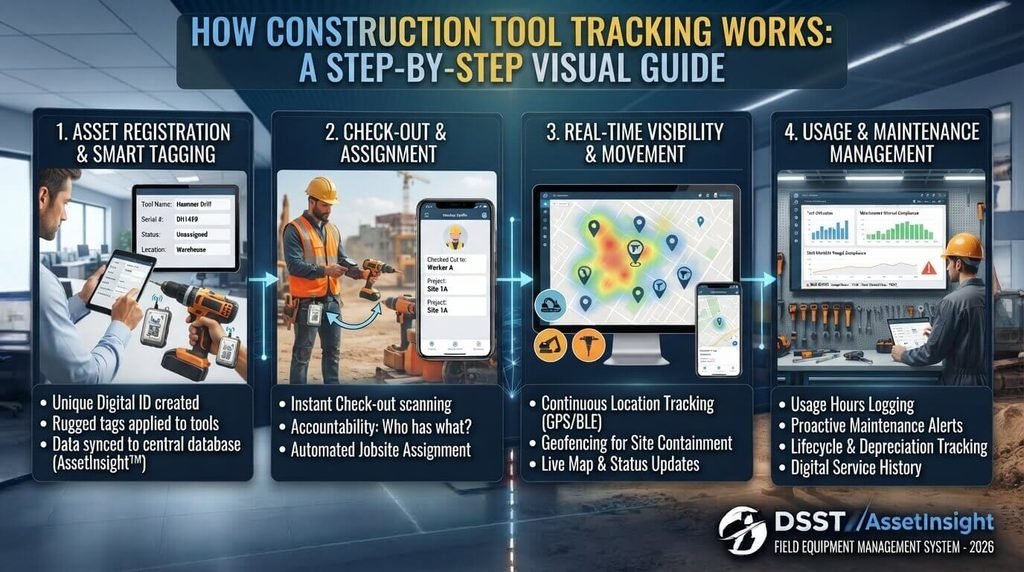
Construction tool tracking can be simple or highly automated depending on the size of the business.
A basic process might look like this:
Inventory → Tag → Assign → Track → Maintain → Return → Review
1. Create an Inventory
Start by listing every important tool and piece of equipment.
Include power tools, hand tools, generators, ladders, measuring equipment, compressors, machinery, and other assets that need accountability.
Do not try to create a complicated system immediately. Begin with the assets that are most expensive, frequently moved, or most likely to be misplaced.
2. Give Each Tool a Unique ID
Each important asset should have a unique identification number.
For example:
- TOOL-001
- TOOL-002
- TOOL-003
- EQUIP-001
- EQUIP-002
The physical label should match the digital record.
Depending on the asset and tracking requirements, companies can use printed labels, barcodes, QR codes, RFID tags, Bluetooth tags, or GPS devices.
3. Assign Tools to People, Crews, Vehicles, or Projects
Instead of allowing tools to move without a record, establish clear responsibility.
A tool can be assigned to:
- An individual employee
- A construction crew
- A company vehicle
- A warehouse
- A job site
- A specific project
This makes it easier to identify the last known location and responsible party.
4. Record Check-Out and Check-In
A simple check-in/check-out process can make a major difference.
When a worker takes a tool, the system records the transaction. When the tool is returned, the status is updated.
For example:
Available → Checked Out → Job Site → Returned → Inspected → Available
This creates a history of tool movement instead of relying on memory or informal conversations.
Construction Tool Management Software vs. Spreadsheets
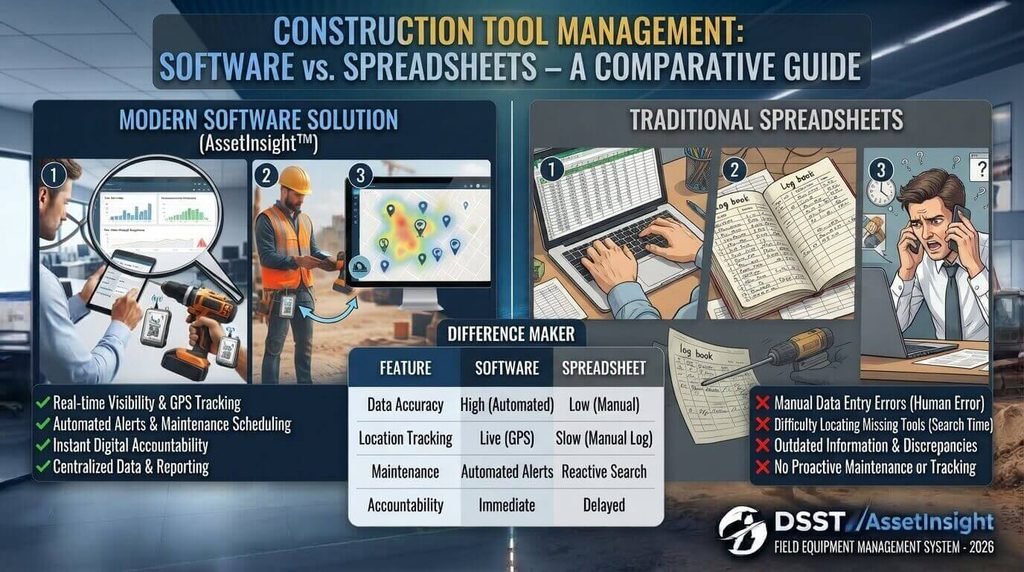
Small businesses may begin with spreadsheets, but construction operations can become difficult to manage when the number of assets and locations increases.
A spreadsheet can record:
- Tool names
- Asset numbers
- Locations
- Employees
- Purchase information
- Maintenance dates
- Status
However, dedicated construction tool management software can provide additional features such as mobile access, barcode scanning, automated alerts, assignment history, maintenance scheduling, and centralized records.
The right choice depends on the company’s size and requirements.
If your company is evaluating software for a wider digital transformation project, our guide on how to choose the right software for your business size provides useful considerations around business requirements and software selection.
| Feature | Spreadsheet | Tool Management Software |
|---|---|---|
| Basic inventory | Yes | Yes |
| Tool assignments | Manual | Usually automated |
| Mobile access | Possible | Common |
| QR/barcode scanning | Limited | Common |
| Maintenance alerts | Manual | Automated options |
| Multi-site visibility | More difficult | Easier |
| Usage history | Manual | Usually built in |
| Real-time updates | Limited | Often available |
A spreadsheet can be a practical starting point. Software becomes more valuable as the operation becomes larger or more distributed.
Key Features to Look for in Construction Tool Management Software
If you are evaluating construction tool tracking software, focus on features that solve real operational problems rather than choosing a system simply because it has a long feature list.
Asset Inventory Management
The system should provide a searchable inventory containing tools, equipment, and relevant asset information.
Tool Assignment
Managers should be able to assign assets to workers, crews, vehicles, or projects.
QR and Barcode Scanning
QR codes and barcodes can make check-in and check-out faster because workers can scan an asset instead of manually searching through a database.
Maintenance Tracking
A good system should help teams record inspections, repairs, service dates, and maintenance history.
Location Tracking
For valuable equipment, location information can help managers understand where an asset is currently being used.
Mobile Access
Construction teams work away from desks. Mobile access allows supervisors and workers to update records directly from the job site.
Alerts and Notifications
Useful alerts can remind teams about overdue returns, upcoming maintenance, missing equipment, or changes in asset status.
Reporting
Reports can help managers understand asset usage, maintenance costs, inventory levels, and equipment availability.
Current construction asset-management platforms commonly provide combinations of asset assignment, location visibility, maintenance records, mobile access, and inventory reporting. For example, Hilti’s ON!Track describes asset tracking from warehouses to vehicles and jobsites, while DEWALT’s TOOL CONNECT focuses on asset management, location tracking, and utilization data.
QR Codes, RFID, and GPS: Which Tracking Method Should You Use?
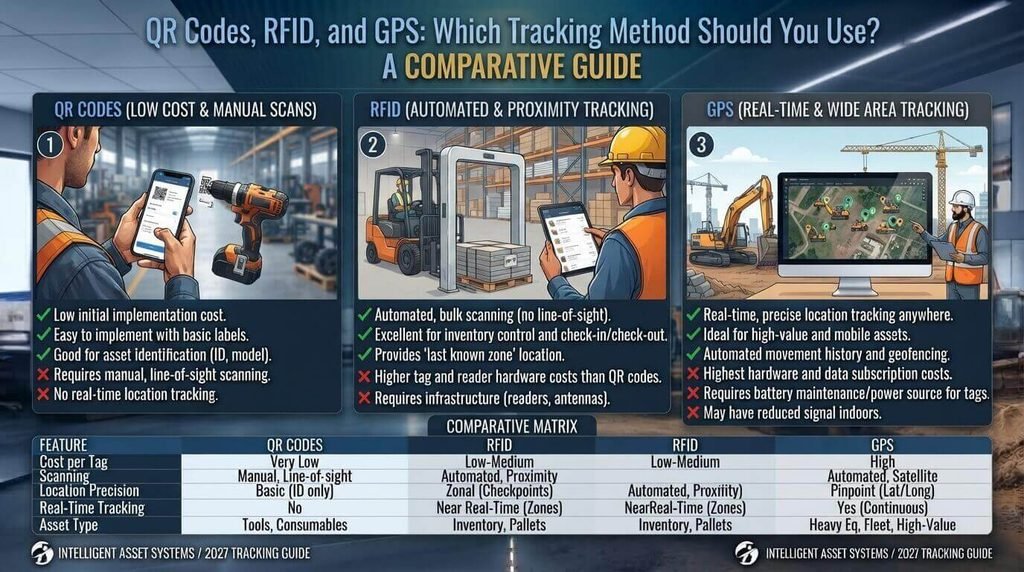
There is no single tracking technology that works perfectly for every construction business.
QR Codes
QR codes are inexpensive and simple to implement. A worker can scan the code with a smartphone to access the asset record.
They are particularly useful for hand tools and equipment that are regularly checked in and out.
Barcodes
Barcodes provide a familiar inventory system and can be useful for warehouses and tool storage areas.
RFID
RFID can allow assets to be identified using radio-frequency technology. It may be useful where a company needs faster identification of multiple tagged assets.
GPS Tracking
GPS is more suitable for valuable equipment where knowing the location is particularly important.
For example, large machinery, trailers, generators, and other high-value assets may benefit from location monitoring.
The best approach may be a combination of technologies rather than relying on one method for every asset.
For example, current construction tracking systems use combinations of QR codes, barcodes, Bluetooth/RFID technologies, and GPS depending on the asset and tracking requirement.
How to Build a Construction Tool Management Process
A successful system does not have to be complicated.
Follow these steps.
Step 1: Identify Your Assets
Create a complete list of the tools and equipment you want to manage.
Start with high-value and frequently used assets.
Step 2: Categorize Everything
Create categories such as:
- Power tools
- Hand tools
- Heavy equipment
- Measuring equipment
- Safety equipment
- Generators
- Compressors
- Lifting equipment
Consistent categories make searching and reporting easier.
Step 3: Standardize Asset Names
Avoid having multiple names for the same type of tool.
For example, choose one standard such as “Cordless Drill” instead of using “Drill,” “Power Drill,” and “Battery Drill” randomly.
Step 4: Add Identification Tags
Apply a unique ID, barcode, or QR code to each relevant asset.
Make sure the physical label is easy to read and remains attached during normal use.
Step 5: Create Check-In and Check-Out Rules
Decide exactly when employees must update the system.
For example:
Warehouse → Vehicle → Job Site → Vehicle → Warehouse
Every transfer should be recorded.
Step 6: Schedule Inspections and Maintenance
Create a routine for checking tools before and after use.
Record repairs and maintenance so managers can identify recurring problems.
Step 7: Review the Data
Regularly examine which tools are frequently used, rarely used, missing, damaged, or repeatedly repaired.
This information can help guide future purchasing decisions.
Common Construction Tool Management Mistakes
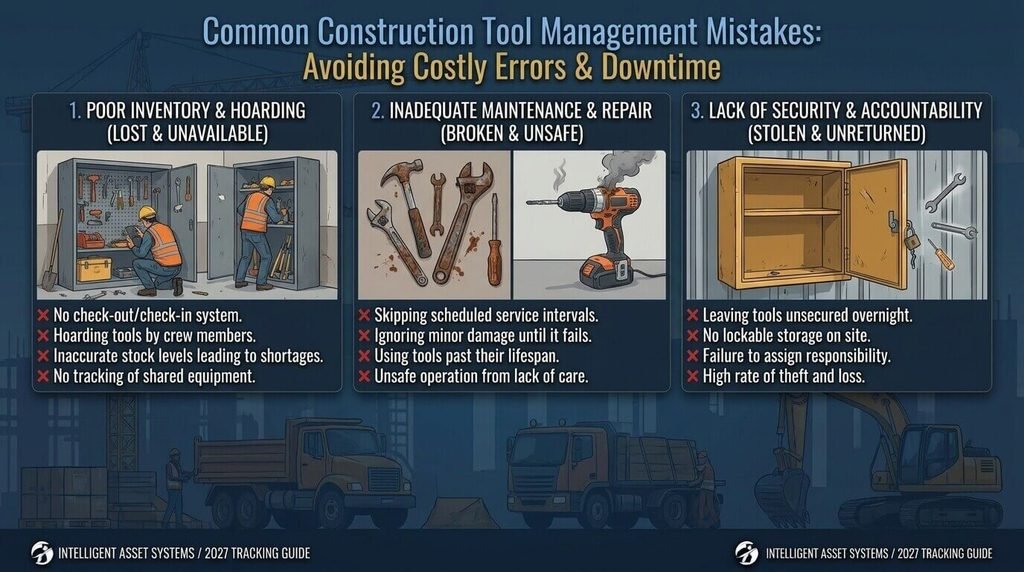
Even companies with tracking systems can create problems if their processes are inconsistent.
1. Tracking Only Expensive Equipment
Small tools can also create significant operational problems when they frequently disappear or become difficult to locate.
2. Using Different Naming Systems
Inconsistent asset names make inventory searches confusing.
3. Making Check-Out Optional
If workers do not consistently record tool movements, the database quickly becomes inaccurate.
4. Ignoring Maintenance Data
A tool management system should not only tell you where equipment is. It should also help you understand its condition.
5. Choosing Overly Complicated Software
A system that workers find difficult to use may create more administrative work instead of reducing it.
6. Failing to Train the Team
Technology works only when the people using it understand the process.
Keep the workflow simple and explain why accurate tool records matter.
Benefits of Construction Tool Management
A well-organized system can provide several operational benefits.
Better Tool Visibility
Managers can quickly determine what equipment is available and where it is located.
Reduced Unnecessary Purchases
Before buying another tool, teams can check whether an existing asset is already available elsewhere.
Improved Accountability
Assignment records create a clearer history of who had a particular asset and when.
Easier Maintenance
Maintenance records make it easier to schedule inspections and repairs.
Better Equipment Utilization
Managers can identify equipment that is sitting unused while another project needs the same type of asset.
More Efficient Job Sites
Workers spend less time searching for equipment when tools have clear locations and ownership.
How Much Does Construction Tool Management Cost?
The cost depends on the size of the inventory and the technology being used.
A basic spreadsheet-based system can cost little beyond the time required to create and maintain it.
Digital construction inventory management software may use monthly or annual subscription pricing. More advanced systems can add costs for physical tags, scanners, GPS devices, integrations, or other hardware.
Instead of choosing a system based only on price, consider the potential operational value.
Ask:
- How many assets need tracking?
- How many job sites are involved?
- How many employees use the equipment?
- Do you need GPS tracking?
- Do you need maintenance management?
- Does the system work on mobile devices?
- Can it integrate with existing software?
Future Trends in Construction Tool Management
Construction asset management is becoming increasingly connected.
Mobile applications, cloud-based platforms, IoT devices, GPS tracking, QR codes, RFID, and connected equipment can give businesses more information about their assets.
Artificial intelligence may also become more useful for analyzing equipment data, identifying unusual usage patterns, predicting maintenance needs, and helping managers make better resource decisions.
For businesses building digital tools around these workflows, modern custom web application development can also be relevant when off-the-shelf software does not match a company’s specific requirements.
However, technology should support a good process rather than replace one.
The foundation remains the same: accurate inventory, clear responsibility, consistent check-in/check-out procedures, and reliable maintenance records.
Frequently Asked Questions
What is construction tool management?
Construction tool management is the process of organizing, tracking, assigning, maintaining, and monitoring tools and equipment used by construction teams. It helps businesses maintain accurate inventory records and understand where equipment is located and who is responsible for it.
Why is construction tool management important?
It helps construction businesses improve visibility, accountability, maintenance, and equipment utilization. A structured system can also reduce time spent searching for tools and help managers make more informed purchasing decisions.
How do construction companies track tools?
Companies can use spreadsheets, barcodes, QR codes, RFID tags, mobile applications, GPS devices, or dedicated construction tool tracking software. The appropriate method depends on asset value, fleet size, locations, and tracking requirements.
What is construction tool management software?
Construction tool management software is a digital platform used to manage tool inventories, assignments, locations, maintenance records, and usage history. Many systems also provide mobile access and scanning features.
Are QR codes useful for construction tool tracking?
Yes. QR codes can provide a relatively simple way to identify assets and connect physical tools to digital records. Workers can scan a code using a compatible smartphone and update the tool’s status or location.
Should every construction tool have GPS tracking?
No. GPS tracking may be more appropriate for high-value or mobile assets where location information is particularly important. Lower-cost tools may be better managed with QR codes, barcodes, RFID, or check-in/check-out procedures.
How can construction companies reduce lost tools?
Start with a centralized inventory, unique asset IDs, clear assignments, check-in/check-out procedures, regular inventory audits, and appropriate tracking technology. Consistent employee adoption is also essential.
What should construction tool management software include?
Important features can include inventory management, asset assignments, QR/barcode scanning, maintenance records, mobile access, location tracking, alerts, reporting, and historical usage records.
Conclusion
Effective construction tool management is about more than knowing how many tools a company owns. It is about knowing where those tools are, who is responsible for them, what condition they are in, and when they are available for the next project.
A practical system can begin with a simple inventory and check-in/check-out process. As a construction business grows, it can add QR codes, barcode scanning, mobile applications, maintenance tracking, GPS, RFID, or dedicated construction tool management software.
The most important step is to create a consistent process that your entire team can actually follow.
When inventory, assignments, locations, maintenance, and usage history are managed together, construction businesses can make better decisions and keep their teams better equipped for the work ahead.