
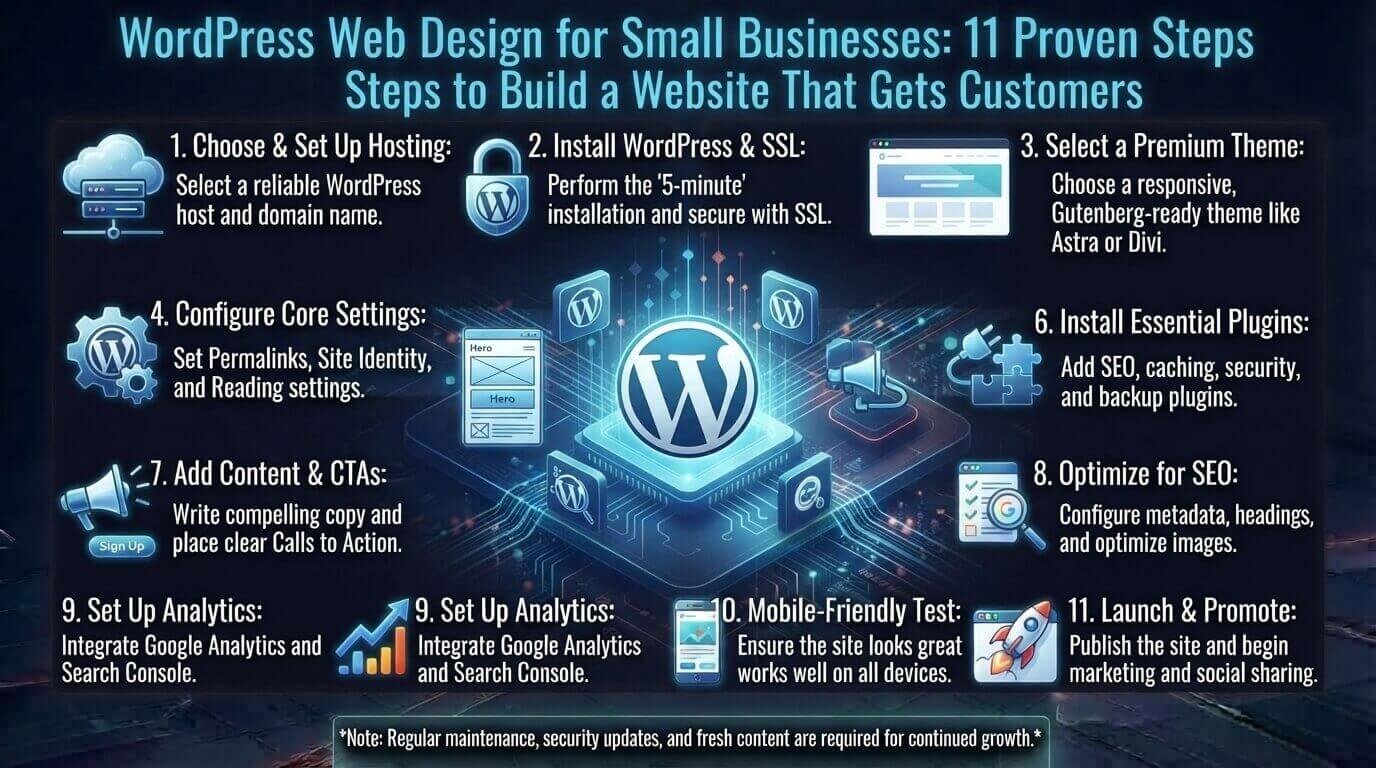
A small business website should do more than look professional. It should help potential customers understand what you offer, trust your business, find the information they need, and take the next step.
That is why WordPress web design for small businesses should start with your business goals rather than colors, fonts, or fancy animations.
Whether you run a local plumbing company, consulting business, cleaning service, online store, or professional practice, a well-planned WordPress website can become an important source of leads and sales.
This guide explains how to plan, design, optimize, and maintain a small business website that is easy to use, search-friendly, fast, and focused on conversions.
1. Start With Your Business Goal Before Designing Your Website
Before choosing a WordPress theme, ask one simple question:
What should visitors do after they arrive at my website?
Your answer should influence the entire web design.
For example:
| Business Type | Main Website Goal | Primary CTA |
|---|---|---|
| Plumber | Generate service calls | Call Now |
| Consultant | Generate consultations | Book a Consultation |
| Local restaurant | Generate orders or reservations | Order Now |
| Online store | Sell products | Shop Now |
| Photographer | Generate inquiries | Request a Quote |
Imagine a local HVAC company.
A beautiful homepage is useful, but it will not help much if visitors cannot quickly find the services offered, service area, phone number, or appointment option.
A better structure might be:
Heating & Cooling Services → Service Areas → Customer Reviews → Why Choose Us → Request Service
This is the difference between designing a website that simply looks good and designing one that supports a business.
2. Plan the Essential Pages for a Small Business Website
One common mistake is creating pages randomly as the website grows.
Instead, plan your website structure before publishing.
Most small businesses can start with these core pages:
- Home
- About
- Services
- Individual service pages
- Contact
- FAQ
- Testimonials or Reviews
- Blog or Resources
- Privacy Policy
- Terms and Conditions
Create Individual Service Pages
If your business provides several services, do not put everything on one huge Services page.
For example, a landscaping company might have:
- Lawn Care
- Garden Design
- Tree Trimming
- Irrigation Installation
- Seasonal Cleanup
Each important service can have its own page explaining:
- What the service includes
- Who needs it
- Benefits
- Pricing information where appropriate
- Service area
- Frequently asked questions
- Customer reviews
- A clear call to action
This gives visitors more useful information and creates additional opportunities to appear for relevant searches.
3. Design a Homepage That Converts Visitors
Your homepage is often the first serious interaction someone has with your business.
Do not make visitors guess what you do.
A conversion-focused homepage should usually answer four questions quickly:
- What does your business offer?
- Who do you serve?
- Why should visitors trust you?
- What should they do next?
A practical homepage structure looks like this:
Hero Section
Clearly explain the main service and location or audience.
For example:
Reliable HVAC Repair in Dallas
“Fast heating and cooling service for homeowners throughout the Dallas area.”
Then add a clear button:
Request Service
Trust Section
Show useful trust signals such as:
- Years in business
- Customer reviews
- Certifications
- Guarantees
- Professional memberships
- Number of customers served
Services Section
Briefly introduce your main services and link to their dedicated pages.
Benefits Section
Explain why customers should choose your business.
Avoid generic claims such as “We are the best.”
Instead, use specific benefits:
- Same-day appointments
- Upfront estimates
- Licensed technicians
- Weekend availability
Reviews
Customer feedback can help reduce uncertainty before someone contacts you.
FAQ
Answer common questions about pricing, availability, service areas, timelines, or processes.
Final CTA
End the page with one obvious next step.
For example:
Need HVAC Service Today? Request an Appointment
4. Make Your WordPress Website Mobile-Friendly
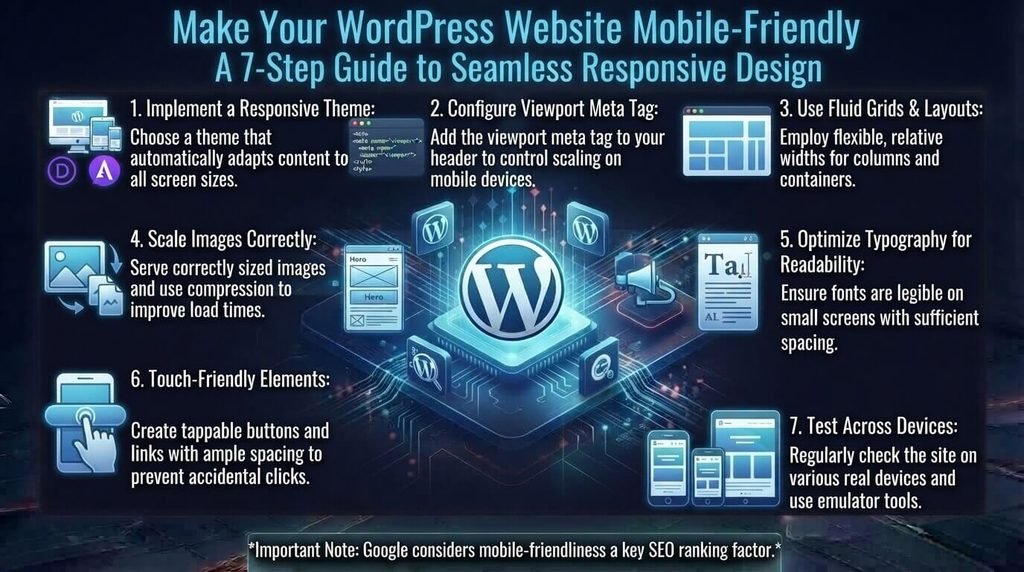
A small business website cannot be designed only for desktop visitors.
People may discover your business while searching from a phone, checking directions, comparing services, or trying to call you.
Your WordPress web design should therefore use responsive layouts that adapt to different screen sizes.
Check these elements carefully on mobile:
- Navigation menus
- Font sizes
- Buttons
- Contact forms
- Images
- Tables
- Pricing sections
- Pop-ups
- Videos
- Spacing between clickable elements
Your phone number should also be easy to tap.
If a customer has to zoom in just to find your contact information, the design needs improvement.
Before launching, test the website on different screen sizes and check whether visitors can complete the most important actions without frustration.
5. Build WordPress SEO Into the Design
SEO should not be something you add after the website is finished.
Your website structure, content, URLs, headings, internal links, and page experience all contribute to how useful your site is to visitors and search engines.
Start with a clear page hierarchy.
For example:
Home → Services → Web Design → WordPress Web Design for Small Businesses
Use descriptive page titles and URLs rather than meaningless strings of numbers or characters.
For example:
/wordpress-web-design-for-small-businesses/
is much clearer than:
/page?id=248
Google recommends descriptive URLs because they can help users and search engines understand the content and structure of a page.
Use One Clear H1
Each important page should have a clear main heading describing the topic.
For this article, the primary keyword appears naturally in the H1:
WordPress Web Design for Small Businesses: 11 Proven Steps to Build a Website That Gets Customers
Use H2 and H3 headings to organize supporting topics.
Write Useful Meta Titles and Descriptions
Your title and description should accurately explain what the page offers.
Do not write them only for search engines. Write them for the person deciding whether to click.
Add Internal Links
Internal linking helps visitors discover related information and gives search engines additional context about your website.
For example, an article about small business WordPress design can naturally connect to related TechDigitalNet content about website development costs, coding, CSS animation, and other web-development topics.
Google also recommends using relevant links to connect users and search engines with related resources.
Keep URLs Simple
Use short, descriptive URLs that make sense to users.
Avoid unnecessary dates, numbers, or complicated URL structures unless your website genuinely needs them.
6. Use Local SEO If You Serve a Specific Area
For many small businesses, local search visibility is more important than trying to rank nationally.
A local electrician in Chicago does not necessarily need visitors from every state. The business needs relevant customers in the areas it actually serves.
Create useful location information instead of publishing dozens of nearly identical location pages.
For example:
Electrician in Chicago
can explain:
- Services available
- Neighborhoods served
- Typical customer problems
- Response times
- Local considerations
- Contact information
- Reviews from customers
Keep your business name, address, phone number, and other important business details consistent across relevant online profiles.
You can also use appropriate structured data to help search engines understand information about your organization and local business. Google explains that structured data provides explicit clues about the meaning of page content, although it does not guarantee a rich result.
The goal is not to add location keywords everywhere. The goal is to make it genuinely clear where you operate and who you serve.
7. Improve WordPress Website Speed and Performance
A visually impressive website can still perform poorly if it loads slowly.
Large images, unnecessary plugins, excessive scripts, poorly configured hosting, and heavy page builders can all contribute to performance problems.
Start with the basics:
Optimize Images
Resize images before uploading them and use modern formats where appropriate.
A 4 MB image does not need to remain 4 MB if the displayed version is only 800 pixels wide.
Remove Unnecessary Plugins
WordPress has thousands of plugins, but installing more plugins does not automatically make a website better.
Only use plugins that provide a genuine business or technical benefit.
Use Caching
A suitable caching solution can reduce repeated work for your server and improve page delivery.
Choose Appropriate Hosting
Cheap hosting may be adequate for a small website, but your requirements can change as traffic and functionality grow.
Consider:
- Server performance
- Reliability
- Backup options
- Security features
- Support
- Scalability
Test Real Pages
Do not test only the homepage.
Check important pages such as:
- Service pages
- Contact page
- Blog posts
- Product pages
- Checkout pages
- Landing pages
8. Choose WordPress Themes and Plugins Carefully
Your WordPress theme controls much of the website’s visual presentation, while plugins add functionality.
Do not choose a theme simply because the demo looks impressive.
Look for:
- Responsive design
- Accessibility considerations
- Regular updates
- Clean layouts
- Good customization options
- Performance-conscious development
- Compatibility with your plugins
For plugins, ask:
Does my business actually need this?
For example, a small service business might need:
- Contact form
- SEO functionality
- Backup solution
- Security protection
- Caching/performance tools
- Analytics integration
It probably does not need five different plugins doing nearly the same thing.
Keep Business Functionality Separate From the Theme
Your contact forms, SEO data, and other important functionality should not disappear simply because you change your design theme.
This makes future redesigns much easier.
9. Understand the Real Cost of WordPress Web Design
WordPress itself can be inexpensive to start, but a professional business website has other costs.
If you are comparing different development approaches, it is useful to understand the broader website development cost rather than looking only at the initial design fee.
Your total budget may include:
- Domain name
- Web hosting
- Premium theme
- Premium plugins
- Professional design
- Content writing
- Logo and branding
- Photography
- SEO
- Maintenance
- Security
- Website backups
The exact cost depends heavily on the type of website.
A simple five-page service business website is very different from an e-commerce website with hundreds of products.
A Simple Cost Framework
Think about your budget in three stages:
Initial setup:
Design, development, branding, content, domain, and hosting.
Ongoing operation:
Hosting, premium software, backups, security, and maintenance.
Growth:
SEO, new landing pages, content marketing, conversion optimization, and additional functionality.
This approach gives you a more realistic picture than looking only at the initial website development price.
10. DIY WordPress Website vs. Hiring a Professional
You do not automatically need a professional developer.
For a simple website, a business owner with enough time and patience may be able to build a functional WordPress site independently.
If you want to understand the technical side of website creation before choosing the DIY route, learning basic coding skills can give you a better understanding of HTML, CSS, JavaScript, and how websites work.
DIY can make sense when:
- The website is relatively simple
- Your budget is limited
- You enjoy learning technology
- You have time for maintenance
Hiring a professional may make more sense when:
- Your website directly generates leads or sales
- You need custom functionality
- You have a complex design
- SEO is an important acquisition channel
- You do not have time to maintain the website
- A poorly designed site could cost you customers
The important question is not simply:
“Can I build it myself?”
Ask:
“What will it cost my business in time, missed opportunities, and future fixes?”
11. Protect and Maintain Your WordPress Website
Launching your website is not the end of the project.
WordPress websites need ongoing maintenance.
Create a simple maintenance routine that includes:
- Updating WordPress
- Updating themes
- Updating plugins
- Taking regular backups
- Monitoring security
- Checking forms
- Removing spam
- Testing important links
- Reviewing website performance
- Checking analytics
- Updating outdated content
Before making major updates, make sure you have a reliable backup.
Security should also be part of your overall website strategy. A professional website needs more than a good-looking homepage; it needs sensible maintenance and protection.
Also avoid using abandoned plugins or themes simply because they offer a feature you want. A small feature is not worth creating a long-term maintenance problem.
How to Measure Whether Your Small Business Website Is Working
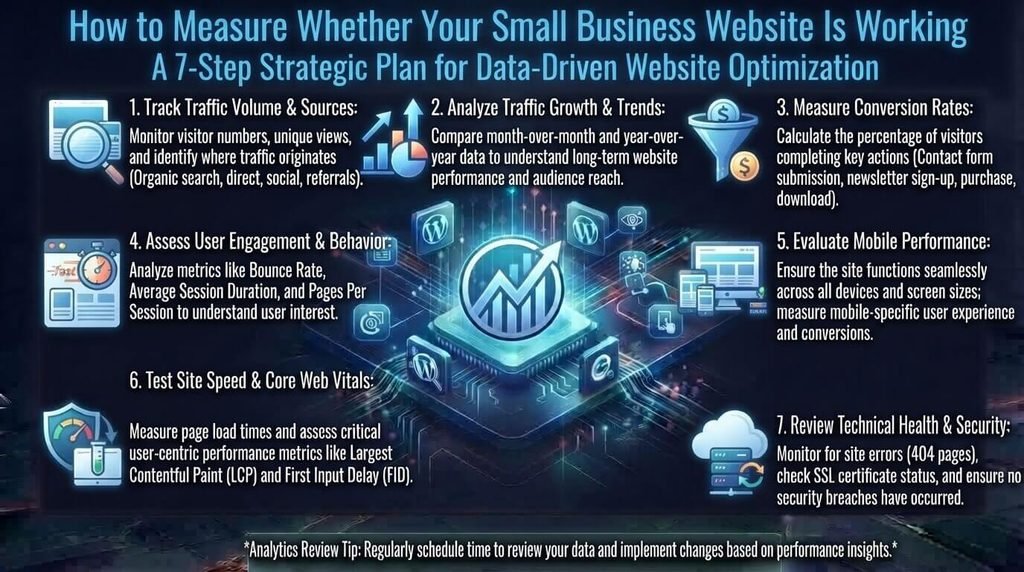
Traffic alone does not tell you whether your website is successful.
A website receiving 10,000 visitors but producing zero inquiries may be less useful to a local business than a website receiving 500 highly relevant visitors and generating 30 leads.
Track meaningful actions such as:
- Contact form submissions
- Phone calls
- Quote requests
- Appointment bookings
- Product purchases
- Email sign-ups
- Important page visits
- Organic search visibility
Google Search Console can help website owners understand how their pages perform in Google Search and how Google crawls, indexes, and serves their content.
For example, suppose a landscaping company receives 1,000 monthly visitors and 20 quote requests.
After improving its service pages and calls to action, traffic might remain similar while quote requests increase to 35.
That is a meaningful improvement because the website is producing more business opportunities.
WordPress Web Design Launch Checklist for Small Businesses
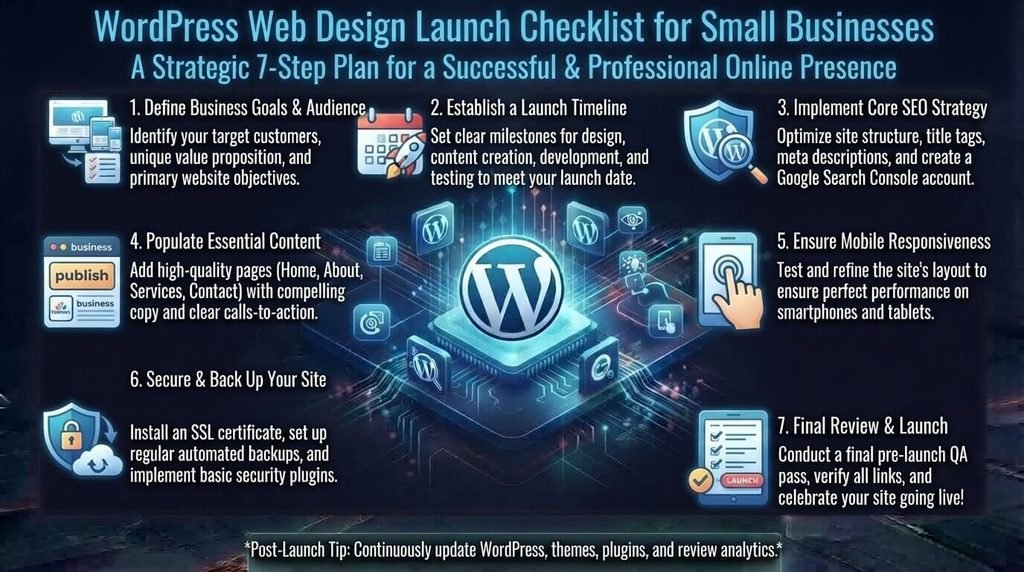
Before launching, check the following:
Design
- Website works on mobile
- Navigation is easy to understand
- Fonts are readable
- Buttons are easy to identify
- Branding is consistent
- Important information is easy to find
Content
- Homepage clearly explains the business
- Services are clearly described
- Important services have dedicated pages
- Contact information is visible
- About page builds trust
- FAQs answer genuine customer questions
SEO
- SEO title is optimized
- Meta description is written
- One clear H1 is used
- H2/H3 headings organize the content
- URLs are descriptive
- Internal links are included
- Images have useful alt text
- XML sitemap is available
- Search Console is configured
- Canonical settings are correct
Google’s SEO documentation recommends descriptive titles, useful content, logical site organization, and making pages accessible to search engines.
Performance
- Images are compressed
- Unnecessary plugins are removed
- Caching is configured where appropriate
- Important pages have been tested
- Mobile performance has been checked
Security
- WordPress is updated
- Plugins are updated
- Themes are updated
- Backups are configured
- Strong passwords are used
- Unused accounts are removed
Common WordPress Web Design Mistakes Small Businesses Should Avoid
Designing for the Owner Instead of the Customer
You may love a particular color or animation, but customers care more about finding answers quickly.
Design around their needs.
If you want to add animation, keep it purposeful. For example, a subtle logo or button effect can add visual polish without making the page distracting. TechDigitalNet’s guide to CSS animation provides more detail on using motion thoughtfully in web design.
Putting Everything on the Homepage
Your homepage should introduce the business, not contain every piece of information you have.
Use dedicated pages for important services and topics.
Using Too Many Plugins
More plugins mean more things to maintain and potentially more conflicts.
Use only what you need.
Ignoring Mobile Users
A desktop-only design can create a frustrating experience for people searching from phones.
Hiding the Call to Action
Do not make customers hunt for your phone number, contact form, booking link, or quote button.
Publishing Thin Service Pages
A page containing only two sentences about a service provides little value.
Explain the problem, service, process, benefits, expectations, FAQs, and next step where relevant.
Forgetting Website Maintenance
A website can look perfect when launched and become outdated months later.
Maintenance should be part of your original plan.
When WordPress May Not Be the Right Choice
WordPress is flexible, but it is not automatically the best solution for every business.
Another platform may make more sense if you need:
- A highly specialized application
- Complex enterprise functionality
- A tightly controlled software environment
- A very specific e-commerce ecosystem
- Custom functionality that would require extensive WordPress modifications
The right platform depends on your technical requirements, budget, internal resources, and long-term goals.
Frequently Asked Questions About WordPress Web Design for Small Businesses
Is WordPress good for small business websites?
Yes. WordPress can support many types of small business websites, including service businesses, blogs, professional websites, membership sites, and online stores.
Its usefulness depends on how the website is designed, maintained, and managed.
How much does WordPress web design cost for a small business?
There is no single price. Costs depend on the website’s size, design requirements, functionality, content, hosting, plugins, and whether you build it yourself or hire a professional.
A simple brochure-style website will generally require a different budget from a custom e-commerce website.
Is WordPress SEO-friendly?
WordPress provides a flexible foundation for SEO, but simply using WordPress does not guarantee search rankings.
Good SEO still requires useful content, logical site architecture, descriptive URLs, appropriate metadata, internal linking, technical optimization, and a strong user experience.
How many pages should a small business website have?
There is no universal number.
A small service business may start with a homepage, About page, several service pages, Contact page, FAQ, and supporting content.
Build pages around genuine customer needs rather than trying to reach a specific page count.
Should a small business hire a WordPress designer?
It depends on the complexity of the project, budget, technical skills, and available time.
If the website is important to your lead generation and you need custom design or functionality, professional help may save time and reduce technical problems.
How can I make my WordPress website load faster?
Start by optimizing images, reducing unnecessary plugins, using suitable hosting, implementing caching where appropriate, and minimizing unnecessary scripts and page elements.
Test important pages rather than assuming that the homepage represents the entire website.
Final Thoughts
Effective WordPress web design for small businesses is not about adding the most features or creating the most complicated design.
It is about building a website that helps the right people find your business, understand your offer, trust you, and take action.
Start with your business goal. Build a clear website structure. Create useful service pages. Make the design mobile-friendly. Build SEO into the site from the beginning. Improve speed, security, and usability. Then measure whether the website is actually generating meaningful business results.
A simple, focused WordPress website that consistently helps customers can be far more valuable than a visually impressive website that nobody understands or uses.