
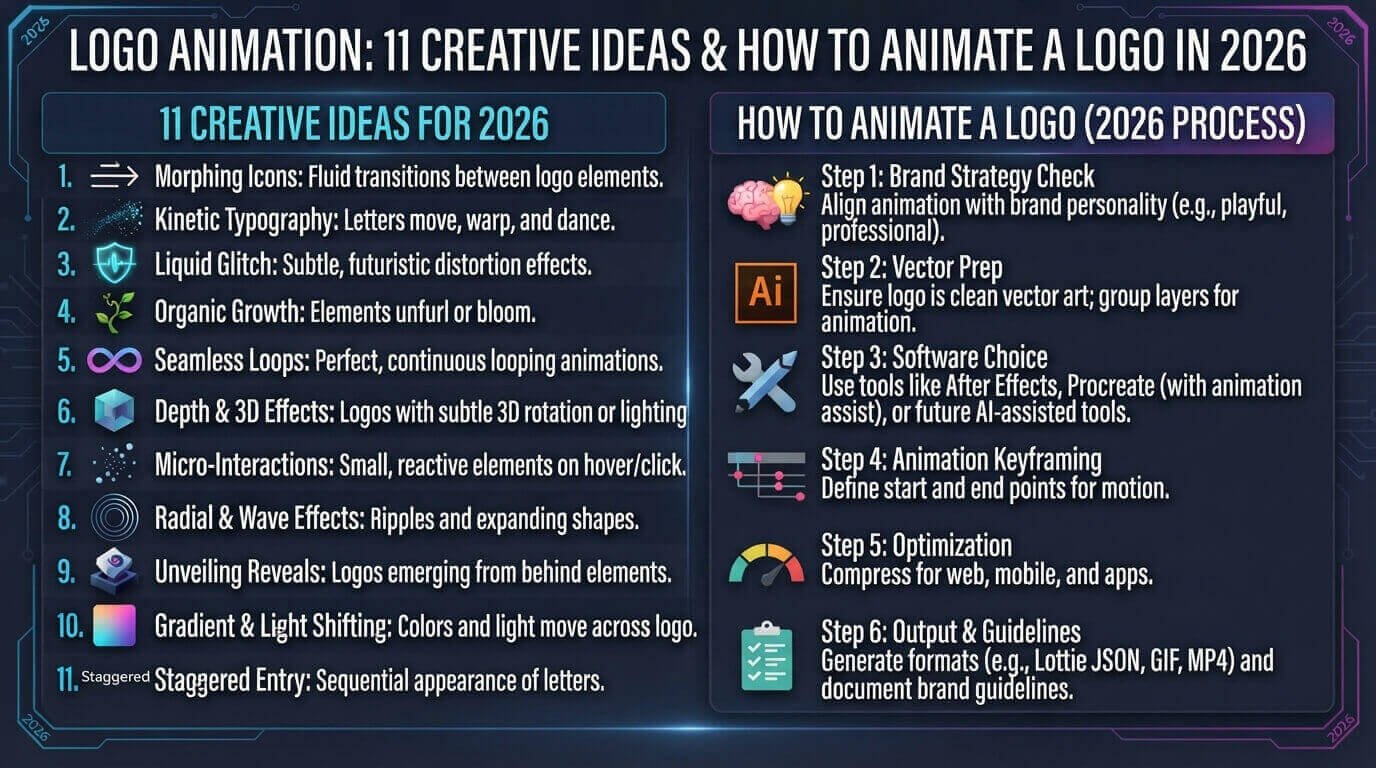
Logo animation turns a static brand mark into a short, memorable motion experience. Instead of simply displaying a logo, an animated logo can reveal, rotate, slide, scale, morph, or build itself on screen.
Today, businesses use logo animation on websites, YouTube videos, social media, presentations, apps, advertisements, and digital campaigns. The best animations are usually short and purposeful: they help introduce the brand without making the viewer wait or distracting them from the main content.
In this guide, you will discover 11 creative logo animation ideas, learn how animated logos work, understand how to create a logo animation, and see how CSS, SVG, video tools, and professional animation software can be used.
What Is Logo Animation?
Logo animation is the process of adding movement to a static logo. The basic logo remains recognizable, but its elements move or appear through a planned sequence.
For example, a logo might:
- Fade into view
- Slide from the side
- Scale from small to normal size
- Rotate slightly
- Draw itself line by line
- Reveal individual letters
- Morph from one shape into another
- Assemble from separate elements
- Respond to a hover effect
- Animate at the beginning of a video
A good animated logo design should still be recognizable when the animation finishes. The motion should support the brand rather than overpower it.
Why Is Logo Animation Important?
Modern brands appear in environments where motion is common. Social media videos, websites, apps, presentations, and digital advertisements all provide opportunities to use movement.
An animated logo can help a business create a more polished visual identity, especially when the animation is consistent with the brand’s colors, typography, and personality.
However, animation should not be added simply because something can move. Current design guidance emphasizes purposeful motion, readability, accessibility, and appropriate use across different platforms.
1. It Captures Attention
Movement naturally creates a visual point of focus. A short logo reveal can make the beginning or ending of a video feel more branded.
2. It Makes Branding More Dynamic
A static logo communicates the visual identity of a company. Animation can add another layer by showing how that identity behaves in motion.
3. It Works Well With Video Content
YouTube videos, social media reels, advertisements, tutorials, and presentations can all use a short animated logo intro or outro.
4. It Can Improve the Professional Look
A simple, well-timed reveal can make a video or website feel more polished without requiring an elaborate visual effect.
11 Creative Logo Animation Ideas
1. Logo Reveal Animation
A logo reveal is one of the simplest and most useful animation styles.
The logo starts hidden or partially visible and gradually appears on the screen. You can use opacity, scaling, masking, or movement to create the reveal.
This style works particularly well for:
- Business websites
- YouTube intros
- Presentations
- Corporate videos
- Social media content
The main advantage is simplicity. Visitors can understand the logo quickly without waiting through a long animation.
2. Fade-In Logo Animation
A fade-in animation gradually changes the logo from transparent to fully visible.
This is a good choice for minimalist brands because it adds motion without making the design feel complicated.
For a website header, a short fade-in can be enough to create a subtle entrance effect.
3. Slide-In Logo Animation
With a slide-in animation, the logo moves from the left, right, top, or bottom into its final position.
For example:
Start → Logo outside the screen → Smooth movement → Final logo position
Keep the movement short and smooth. Excessive movement can make a professional website feel distracting.
4. Scale Logo Animation
A scaling effect makes the logo start smaller and gradually grow to its normal size.
This works particularly well with simple logos and icons.
For example:
.logo {
    animation: logoScale 0.8s ease-out forwards;
}

@keyframes logoScale {
    from {
        opacity: 0;
        transform: scale(0.7);
    }

    to {
        opacity: 1;
        transform: scale(1);
    }
}
If you want to understand how CSS animations work in more detail, see our complete guide to CSS Animation.
5. Rotating Logo Animation
A logo can rotate into position, but this effect should be used carefully.
A small rotation can work for technology, gaming, entertainment, sports, or creative brands. A constant spinning logo, however, can quickly become distracting.
The goal is to create a movement that has a clear beginning and ending.
6. Letter-by-Letter Logo Animation
If your logo contains a wordmark, each letter can appear individually.
For example:
T → TE → TEC → TECH → TECH DIGITAL NET
This technique works especially well for modern digital brands, YouTube channels, agencies, and technology websites.
The animation should remain fast enough that users do not have to wait for the brand name to become readable.
7. Logo Line-Drawing Animation
A line-drawing effect makes the logo appear as if it is being drawn by hand.
This technique is particularly effective for:
- Creative agencies
- Artists
- Photography brands
- Architecture companies
- Fashion brands
- Personal portfolios
SVG is especially useful when individual paths need to be animated.
8. Morphing Logo Animation
A morphing animation changes one shape into another before reaching the final logo.
This can create a memorable effect when the transformation has a logical relationship to the brand.
Morphing should be used carefully because complicated transformations can reduce readability.
9. Logo Assembly Animation
Instead of showing the complete logo immediately, individual parts can move together and create the final mark.
For example:
Icon + text + shape → movement → complete logo
This is a strong option for technology and creative brands because it can communicate the idea of building, connecting, or assembling.
10. 3D Logo Animation
A 3D logo animation can use depth, lighting, shadows, perspective, and rotation.
It can look impressive in:
- Gaming videos
- Technology presentations
- YouTube channels
- Product advertisements
- Entertainment branding
However, 3D effects can increase production complexity. A simple 2D animation is often a better choice when speed, performance, and clarity are more important.
11. Interactive Logo Animation
An interactive logo responds to something the visitor does.
For example, the logo might:
- Change slightly on hover
- Move when the cursor approaches
- Reveal an element when clicked
- React to scrolling
- Animate when a page loads
For websites, CSS is often enough for simple effects, while JavaScript or specialized motion libraries can be useful for more complex interactions.
How to Animate a Logo
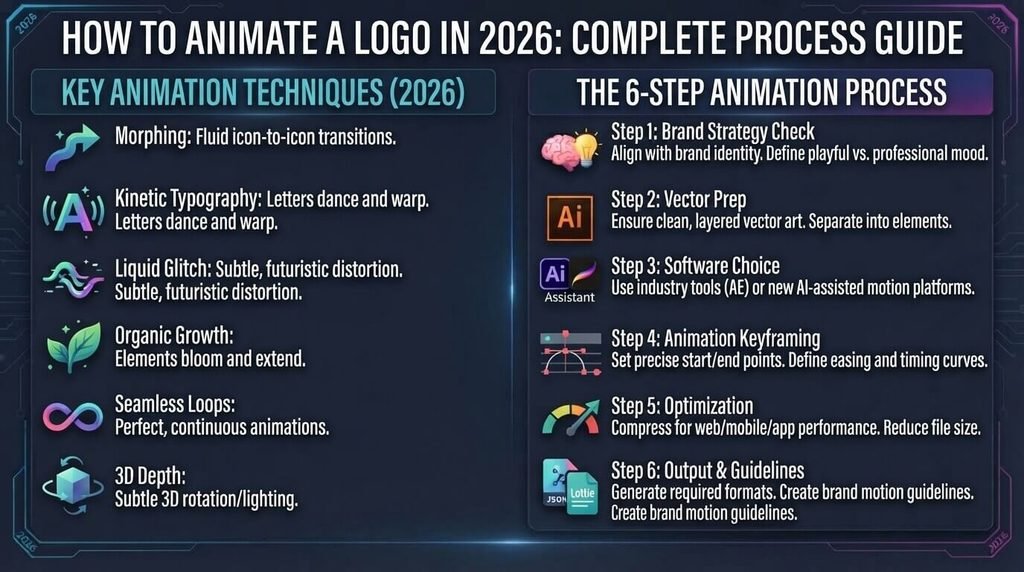
Creating a professional logo animation does not necessarily require complicated software.
The process usually starts with a well-prepared static logo.
Step 1: Start With a Good Logo
Your static logo should work before you animate it.
Make sure:
- The logo is readable
- The shapes are clean
- Colors are consistent
- Typography is clear
- The logo works at different sizes
- Individual elements can be separated when necessary
Adobe’s logo animation guidance also recommends preparing logo elements on separate layers when you want greater flexibility during animation.
Step 2: Choose the Animation Style
Decide what type of movement matches the brand.
A technology company might use a clean reveal or assembly effect.
A creative studio might use line drawing or morphing.
A professional business might prefer a subtle fade or slide.
The animation should communicate the personality of the brand rather than simply demonstrate an effect.
Step 3: Keep the Animation Short
A logo animation normally works best when the viewer can understand it quickly.
For video intros, a short sequence is generally more practical than a long cinematic animation.
Remember:
Logo → Motion → Recognition → Content
Do not make visitors wait through unnecessary effects.
Step 4: Animate the Right Elements
You can animate:
- Logo icon
- Text
- Individual letters
- Shapes
- Lines
- Background
- Shadows
- Color transitions
If your logo contains multiple elements, consider animating them separately and then bringing them together.
Step 5: Choose the Right Tool
Different projects require different tools.
CSS Animation
CSS is excellent for simple website effects such as:
- Fade-ins
- Scaling
- Hover animations
- Sliding
- Rotations
- Page-load effects
For more CSS techniques, explore our guide to HTML, CSS, Bootstrap & Sass.
SVG Animation
SVG works well when your logo is vector-based and individual shapes or paths need to move.
Adobe After Effects
Professional motion designers often use After Effects for more advanced logo animation, including complex effects, timing, layers, and motion graphics. Adobe provides dedicated tutorials for animating logos and exporting them for video.
Online Logo Animation Tools
Online tools can be useful when you want a quick animated logo without learning professional motion-design software.
For a simple business project, an online tool may be enough. For a larger brand campaign, professional motion design gives you more control.
Logo Animation for Websites
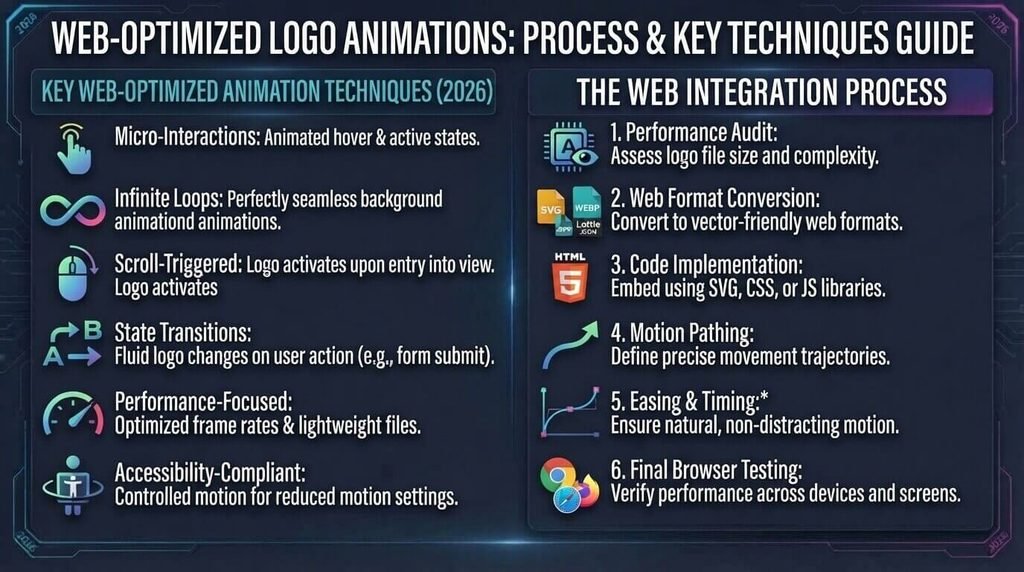
Adding an animated logo to a website can make a brand feel more dynamic, but performance should remain a priority.
For simple website animations, CSS can be an excellent option because it avoids unnecessary JavaScript for basic effects.
When creating web animations, prefer efficient properties such as:
transformopacity
For example, a simple logo entrance can combine opacity and scale:
.logo-animation {
    opacity: 0;
    transform: scale(0.85);
    animation: logoReveal 0.7s ease-out forwards;
}

@keyframes logoReveal {
    to {
        opacity: 1;
        transform: scale(1);
    }
}
For a deeper explanation of CSS animation performance and practical examples, visit our CSS Animation guide.
Logo Animation for Social Media and Videos
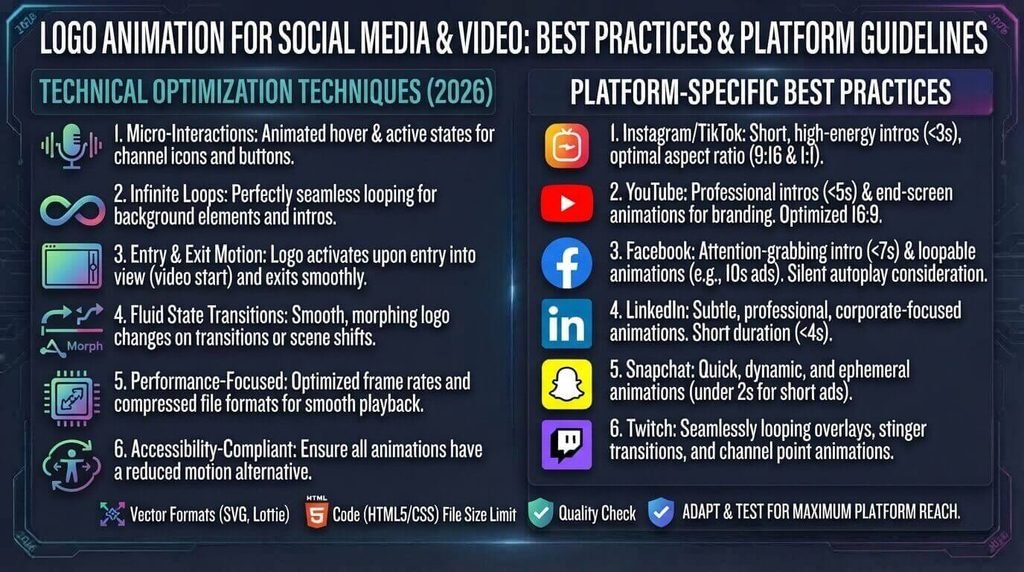
Social media is one of the most practical places to use an animated logo.
You can add a short logo animation to:
- YouTube intros
- YouTube outros
- Instagram Reels
- TikTok videos
- Facebook videos
- LinkedIn videos
- Promotional advertisements
- Tutorials
- Product demonstrations
A good approach is to create one reusable animation and adapt it to different video formats.
This keeps branding consistent while saving production time.
Animated Logo vs Static Logo
Both formats have a purpose.
| Feature | Static Logo | Animated Logo |
|---|---|---|
| Website header | Excellent | Useful in selected cases |
| Printed material | Excellent | Not applicable |
| Social media video | Basic | Excellent |
| YouTube intro | Limited | Excellent |
| Business cards | Excellent | Not applicable |
| Presentations | Good | Excellent |
| App interface | Good | Useful |
| Brand personality | Strong | Strong + motion |
| Production complexity | Low | Medium to high |
The best strategy is usually not to replace the static logo.
Instead, keep the static logo as the primary brand asset and create an animated version for digital environments where motion adds value.
How to Choose the Best Logo Animation Style
Ask these five questions before creating your animation:
1. What does my brand represent?
Technology, creativity, luxury, education, sports, entertainment, and professional services may require different motion styles.
2. Where will the animation appear?
A website header needs a different approach from a YouTube intro.
3. How long should it be?
Keep it short enough that the viewer understands the brand quickly.
4. Does the animation improve recognition?
If removing the animation makes the logo clearer, the animation may be doing too much.
5. Does it work on mobile?
Always test animated logos on smartphones and slower devices.
Common Logo Animation Mistakes
1. Using Too Many Effects
Combining rotation, zoom, glow, particles, blur, and 3D effects does not automatically create a professional animation.
Sometimes a simple reveal looks much better.
2. Making the Animation Too Long
People generally want to reach the actual content quickly.
A logo animation should introduce the brand rather than delay the message.
3. Making the Logo Difficult to Read
The final logo should be clear.
If users need to watch the animation several times to understand the brand name, the effect needs improvement.
4. Ignoring Mobile Performance
Large video files and complicated animations can negatively affect the experience on mobile devices.
Optimize assets and test the result before publishing.
5. Ignoring Accessibility
Some users prefer reduced motion. Websites should respect the user’s system preference when animations are not essential.
For example:
@media (prefers-reduced-motion: reduce) {
    .logo-animation {
        animation: none;
    }
}
This gives users who prefer reduced motion a simpler experience.
6. Animating Just Because You Can
The biggest mistake is adding movement without a reason.
A good rule is:
If the animation does not improve the brand experience, remove it.
Best Logo Animation Ideas for Different Businesses
| Business Type | Recommended Animation |
|---|---|
| Technology company | Digital reveal or assembly |
| Software company | Clean UI-style animation |
| Gaming brand | 3D or energetic reveal |
| Photography business | Smooth fade or line drawing |
| Fashion brand | Elegant reveal |
| Restaurant | Hand-drawn or ingredient-inspired motion |
| Fitness brand | Dynamic scale or movement |
| YouTube channel | Short energetic intro |
| Creative agency | Morphing or experimental animation |
| Professional company | Minimal fade or slide |
Is Logo Animation Good for SEO?
Logo animation itself is not a magic SEO ranking factor.
Google does not simply rank a page higher because its logo moves.
SEO value comes from the overall quality of the page, including useful content, relevant search intent, good technical performance, accessibility, internal linking, and a positive user experience.
Therefore, if you add a logo animation to a website, do not sacrifice:
- Page speed
- Mobile usability
- Accessibility
- Readability
- Clear navigation
- Useful content
Animation should support the website rather than replace good SEO.
How to Create a Professional Logo Animation
A practical workflow looks like this:
1. Design the static logo
↓
2. Separate the logo elements
↓
3. Choose one animation concept
↓
4. Create a short motion sequence
↓
5. Test readability
↓
6. Optimize the file
↓
7. Test on desktop and mobile
↓
8. Export different versions for web and video
This approach prevents the animation from becoming unnecessarily complicated.
If your business website also needs a professional visual foundation, you can learn more about Affordable Web Design Services and the important design decisions to consider before launching a site.
Frequently Asked Questions About Logo Animation
What is logo animation?
Logo animation is the process of adding movement to a static logo. Common effects include revealing, sliding, scaling, rotating, morphing, and assembling logo elements.
How long should a logo animation be?
The ideal length depends on where it will be used. A website animation should generally be quick, while a video intro may have slightly more room. The important point is that viewers should recognize the brand without waiting through unnecessary effects.
Can I create a logo animation with CSS?
Yes. CSS can create many simple logo animations, including fade, scale, slide, rotate, and hover effects. More complex motion may require SVG animation, JavaScript, or professional motion-design software.
What is the best logo animation software?
The best tool depends on your needs. CSS and SVG are useful for websites, while professional tools such as Adobe After Effects provide much more control for advanced motion graphics.
Is an animated logo better than a static logo?
Not necessarily. A static logo remains essential for print, websites, documents, and many other applications. An animated logo is an additional digital asset that can be useful for video, social media, apps, and interactive experiences.
Can logo animation improve branding?
Yes, when used correctly. Motion can add personality and create a recognizable visual experience. However, the animation should remain consistent with the brand and should not make the logo difficult to understand.
What is the easiest logo animation style for beginners?
A simple fade, scale, or slide animation is usually a good starting point. These effects are relatively easy to create with CSS and can look professional when timing is handled well.
Final Thoughts
Logo animation is a powerful way to bring a static brand identity into digital environments.
The best animated logos are not necessarily the most complicated ones. A clean reveal, subtle scale, smooth slide, or well-designed line animation can often create a stronger result than a screen full of effects.
Start with a strong static logo, choose a motion style that matches the brand, keep the animation short, optimize it for performance, and test it across different devices.
If you are creating a website, CSS and SVG can handle many practical logo animation effects. If you need advanced motion graphics for videos or campaigns, professional animation software can provide greater control.
Most importantly, make the motion meaningful.
A good logo tells people who you are. A good logo animation shows them how your brand moves.