
If you have searched “should I use EndBugFlow software for making music,” you may have noticed something unusual: the information online isn’t consistent.
Some pages describe EndBugFlow as a developer and debugging platform, while other pages describe it as a music or audio-production environment. Even recent articles acknowledge that public information about the software is difficult to verify.
So, should you actually use EndBugFlow to make music?
My practical recommendation is to be cautious. Before treating EndBugFlow as a music-production application, verify exactly which product you are looking at, who publishes it, what features are officially documented, and whether it provides the audio and MIDI workflow you need.
If your goal is recording vocals, making beats, arranging songs, editing MIDI, mixing tracks, or mastering music, an established digital audio workstation (DAW) is the more straightforward option.
Quick Answer: Should I Use EndBugFlow Software for Making Music?
Don’t make EndBugFlow your main music-production tool until you have verified its official identity and music-production capabilities.
Endbugflow.com currently presents EndBugFlow primarily around debugging, technology concepts, and development workflow optimization, while other websites make different claims about the product.
For serious music production, use a clearly documented DAW unless you can independently confirm that EndBugFlow meets your requirements.
If you’re researching software more generally, you may also find our guide on what productivity software is and how to choose it useful when comparing different types of software.
Why Is EndBugFlow So Difficult to Evaluate?
The first issue isn’t music production itself. It’s product identification.
The official EndBugFlow website currently describes the platform around end-to-end debugging, workflow optimization, core technology concepts, and developer-focused problem solving.
However, other websites describe EndBugFlow differently. Some pages position it as a bug-tracking or workflow-management platform, while others describe a modular audio environment with features such as sound routing and generative music creation.
That creates an important problem for anyone searching for music software:
You shouldn’t assume that every page using the name “EndBugFlow” is referring to the same product.
Before installing anything, verify the official domain, publisher, documentation, version information, and download source.
What Is EndBugFlow Software?
Based on the current first-party information, EndBugFlow’s official website presents itself around technology and development concepts rather than clearly documenting a conventional music-production DAW.
At the same time, search results contain pages describing a different set of capabilities under the EndBugFlow name. For example, some third-party pages describe an audio-oriented or modular environment, while other pages describe EndBugFlow primarily as a software-development workflow tool.
Because these descriptions conflict, it would be irresponsible to state unverified specifications as facts.
What Does This Mean for Music Producers?
If you’re looking for software to make a song, you need to know exactly what you’re downloading.
A music-production application should clearly document its capabilities for things such as:
- Audio recording
- MIDI sequencing
- Track arrangement
- Audio editing
- Virtual instruments
- Effects
- Mixing
- Automation
- Plugin support
- Audio export
- Project saving and recovery
If those capabilities aren’t clearly documented by the official publisher, that’s a reason to investigate further before relying on the software.
For broader software-selection advice, you can also read TechDigitalNet’s guide on how to choose software based on your actual requirements.
Is EndBugFlow a DAW?
A DAW, or Digital Audio Workstation, is software specifically designed for creating, recording, editing, arranging, mixing, and producing audio.
Typical DAW features include:
- Multitrack audio recording
- MIDI editing
- Piano-roll sequencing
- Virtual instruments
- Audio effects
- Mixing and routing
- Automation
- Track arrangement
- Audio export
Established products such as REAPER and FL Studio clearly document these types of music-production workflows. REAPER, for example, describes itself as a complete digital audio production application with multitrack audio and MIDI recording, editing, processing, mixing, and mastering capabilities.
For EndBugFlow, the situation is less clear because publicly available descriptions don’t consistently identify it as a conventional DAW.
DAW vs Other Music Software
Not every program involved in music needs to be a DAW.
A producer might use:
- A DAW for recording and arranging
- A synthesizer for sound generation
- A sampler for manipulating samples
- A plugin for effects
- A MIDI controller for performance
- A workflow tool for managing projects
The important question is therefore not simply “Can this software be related to music?”
It’s:
“Does this software provide the specific production workflow I need?”
What Should Music Production Software Be Able to Do?
Before choosing EndBugFlow—or any unfamiliar music application—compare its documented capabilities with your workflow.
| What you want to do | Features to look for |
|---|---|
| Make beats | Drum sequencing, MIDI, samples, patterns |
| Record vocals | Audio recording, microphone/interface support |
| Play virtual instruments | MIDI and instrument support |
| Create electronic music | Synthesizers, effects, automation |
| Edit recordings | Waveform editing, cutting, fades |
| Mix songs | Mixer, EQ, compression, effects, routing |
| Master tracks | Master bus processing and metering |
| Work with plugins | Supported plugin formats |
| Collaborate | Reliable project and export options |
| Release finished music | WAV/MP3 and other export options |
This checklist gives you a better basis for choosing software than a generic “best music software” list.
If you’re interested in how software differs by use case, TechDigitalNet also covers application software and software-development concepts.
Can EndBugFlow Be Used to Make Music?
This is where you need to separate verified capabilities from claims made on third-party websites.
Some current search results describe an EndBugFlow environment for sound design and signal routing. One such page calls it a modular audio environment rather than a traditional DAW.
Other pages say EndBugFlow is fundamentally a development or bug-tracking platform and not intended for audio production.
Because these descriptions disagree, you shouldn’t assume that features such as recording, MIDI, VST support, pricing, operating-system compatibility, or export options exist unless you can verify them from the actual product documentation.
That uncertainty itself is important information for someone deciding whether to use the software.
What Should You Verify Before Using EndBugFlow for Music?
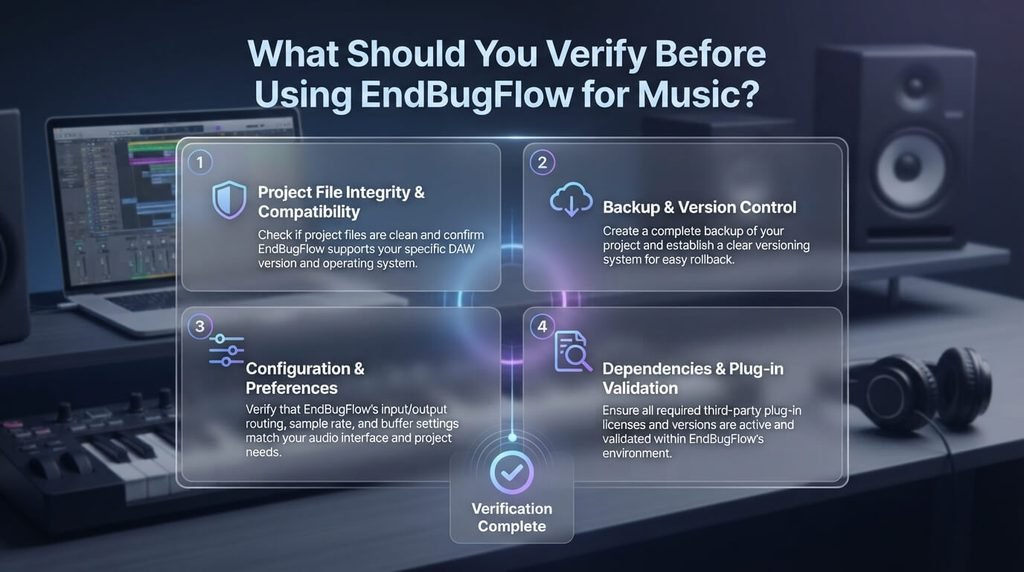
If you still want to try it, use this checklist first.
1. Verify the Official Website
Make sure you’re dealing with the actual publisher rather than an unrelated blog or download site.
Check:
- Official domain
- Developer or company identity
- Contact information
- Documentation
- Terms and privacy information
- Current software version
Start with the official EndBugFlow website rather than relying on a third-party download page.
2. Confirm the Product’s Purpose
Look at the publisher’s own description.
Is it:
- A DAW?
- A modular audio environment?
- A developer tool?
- A debugging platform?
- A project-management application?
Don’t infer the category from an article title.
3. Check Audio Recording
If you record vocals or instruments, verify that the application supports audio input and recording.
For example, a singer needs to connect a microphone through an audio interface, select the correct input, record a take, edit it, and play it back.
If the software doesn’t clearly support this workflow, it isn’t suitable for that particular task.
4. Check MIDI
MIDI is essential for many modern producers.
A MIDI keyboard can be used to play software instruments, while MIDI editing lets you change notes, timing, velocity, and other musical information.
If you rely heavily on MIDI, confirm the application’s MIDI capabilities before committing to it.
5. Check Plugin Support
Many producers use third-party instruments and effects.
If your workflow depends on plugins, check exactly which formats are supported rather than assuming compatibility.
For comparison, REAPER officially documents support for multiple third-party plugin formats, while FL Studio also provides an established plugin-based production workflow.
6. Check Export Options
A useful music-production application should make it clear how you can export your work.
Depending on your workflow, you may need:
- WAV
- MP3
- Stereo mixes
- Individual stems
- High-resolution audio
Never wait until the end of a project to discover that your preferred export format isn’t supported.
Is EndBugFlow Good for Beginners?
There isn’t enough consistent, authoritative information to give every beginner a simple “yes” answer.
A beginner should prioritize clarity and reliability over novelty.
Look for software with:
- Clear documentation
- Beginner tutorials
- A straightforward interface
- Reliable project saving
- Easy audio export
- Active support or community resources
- The features required for your particular type of music
For example, someone making their first beat doesn’t necessarily need the most advanced production environment available. They need a tool that lets them create drums, melodies, arrangements, and exports without unnecessary complexity.
If you’re also comparing software for general productivity or digital work, our productivity software guide explains how to evaluate software based on usability, integration, and scalability.
What About Professional Music Production?
Professional production raises the requirements.
A serious project may involve:
- Multiple recorded tracks
- MIDI instruments
- Large plugin chains
- Automation
- Audio routing
- Multiple takes
- Mixing buses
- High-resolution exports
- Project backups
- Collaboration
This is why established DAWs remain popular. Their value isn’t simply the number of buttons they have; it’s the reliability and ecosystem surrounding the production workflow.
For example, REAPER officially describes a complete multitrack audio and MIDI production environment covering recording, editing, mixing, mastering, routing, and plugin support.
If you’re recording an album, producing client work, or creating music for commercial release, I’d choose a well-documented DAW over a poorly documented or ambiguously described application.
EndBugFlow vs Popular Music Production Software
If your primary goal is music production, compare EndBugFlow against software whose music-production purpose is clearly documented.
| Software | Good choice for | Why consider it |
|---|---|---|
| EndBugFlow | Depends on which product/version you are evaluating | Public descriptions are inconsistent, so verify the actual product first |
| FL Studio | Beat making and electronic production | Strong sequencing, instruments, effects and production workflow |
| REAPER | Recording, editing and mixing | Flexible audio/MIDI production environment |
| Logic Pro | Mac and iPad users | Dedicated Apple music-production environment |
| Ableton Live | Electronic music and performance | Session-based and arrangement-focused workflow |
FL Studio’s official product information describes tools for making beats, recording ideas, and finishing tracks, along with instruments and effects.
REAPER documents multitrack audio and MIDI production, editing, processing, mixing and mastering.
Apple positions Logic Pro specifically around music creation, recording, editing, beat-making, songwriting, remixing and mixing on Mac and iPad.
Ableton describes Live as software for music creation and performance, with audio and MIDI workflows, instruments, effects and creative production features.
Which One Should You Choose?
Use your workflow as the deciding factor.
Making beats: FL Studio is worth considering.
Recording and mixing: REAPER is a strong option.
Mac/iPad music production: Logic Pro is worth evaluating.
Electronic music and performance: Ableton Live is a popular choice.
Considering EndBugFlow: First establish exactly which EndBugFlow product you are evaluating and verify its documented audio capabilities.
A Simple 20-Minute Test for Any New Music Software
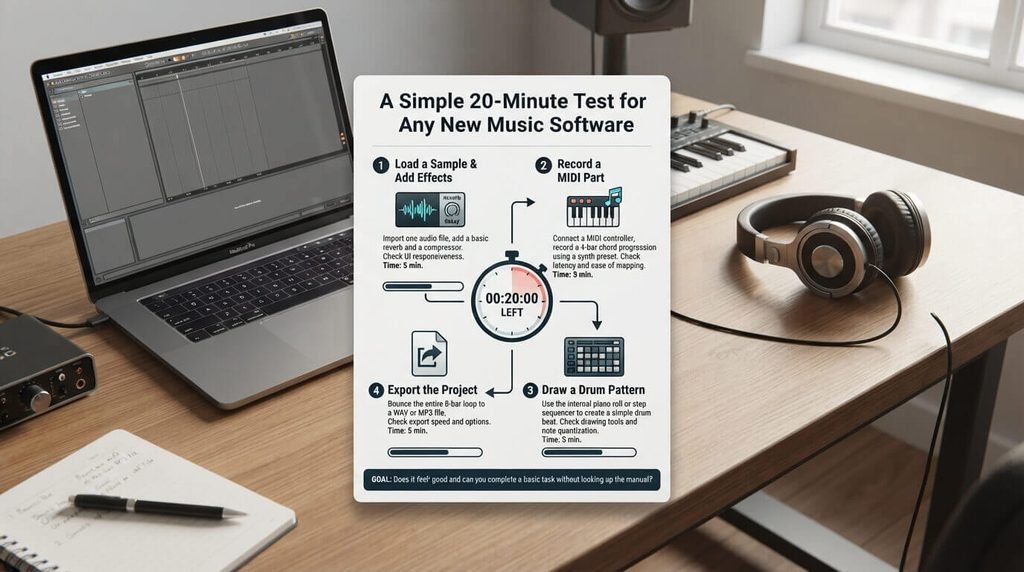
You don’t need to spend weeks learning unfamiliar software before deciding whether it fits.
Try this basic test.
Step 1: Create a New Project
Make a blank project and save it immediately.
Step 2: Add an Audio Source
If audio recording is supported, connect a microphone or audio interface and make a short recording.
Step 3: Test MIDI
If MIDI is supported, connect a keyboard or create a few notes using the software’s MIDI editor.
Step 4: Add an Effect
Try an available effect such as EQ, compression, delay, or reverb.
Step 5: Save and Reopen
Close the application and reopen your project.
This tests something more important than flashy features: whether your basic workflow is reliable.
Step 6: Export
Export a short piece of audio and listen to the result in another player.
If all of these steps work smoothly, you have evidence that the software fits at least part of your workflow.
Common Mistakes When Choosing Music Software
Mistake 1: Trusting the Search Result Alone
A page ranking on Google isn’t automatically an official product source.
This is especially important with EndBugFlow because current search results contain conflicting descriptions of the product.
Mistake 2: Assuming Every Audio Tool Is a DAW
A synthesizer, sampler, plugin, audio editor, or modular environment can be useful without being a complete DAW.
Understand the category before choosing the software.
Mistake 3: Ignoring Plugin Compatibility
If your favorite instruments or effects are essential to your workflow, check compatibility first.
Mistake 4: Starting an Important Project Immediately
Test unfamiliar software with a small project.
Don’t record an entire album before discovering that the application can’t handle your preferred workflow.
Mistake 5: Downloading From an Unofficial Source
Use the publisher’s official download page whenever possible.
Be especially careful with modified installers, pirated versions, and suspicious download sites.
Can You Use a Developer Tool Around a Music Project?
Yes—but that’s different from using it to produce the audio.
A developer or workflow platform can potentially help with technical work around a music application, such as:
- Tracking bugs
- Organizing development tasks
- Managing software issues
- Recording technical problems
- Coordinating a development team
- Planning updates
For example, a company developing a music-production application might use a bug-tracking platform to manage problems reported by users.
The musicians using that application would still need a DAW or another appropriate audio-production tool to create the actual music.
This distinction helps explain why some descriptions of EndBugFlow may mention music-related use cases without making it a music-production application itself.
For readers interested in the broader software-development side, TechDigitalNet’s guide to software development life cycle mistakes explains why requirements, testing, debugging and maintenance matter when evaluating software projects.
So, Should I Use EndBugFlow Software for Making Music?
If your goal is conventional music production, I would not make EndBugFlow your primary tool until its exact product identity and audio capabilities are clearly verified.
The reason is not simply that one website says it is good or another says it is bad. The current information is inconsistent.
The official EndBugFlow website focuses on debugging, technology concepts, and developer workflows, while other pages describe EndBugFlow as either a development workflow platform or a modular audio environment.
For a musician, that uncertainty matters.
If you want to record vocals, create beats, edit MIDI, mix tracks, or produce a finished song, choose software with clearly documented music-production features and an established workflow.
If you’re interested in experimenting with EndBugFlow, verify the official product first and test it with a small project rather than making it the foundation of an important production.
Frequently Asked Questions
Is EndBugFlow a Music Production Software?
The answer is not straightforward because current online descriptions conflict. Endbugflow.com presents the platform around debugging and developer workflows, while some third-party pages describe an audio-oriented EndBugFlow product. Verify the specific product and publisher before treating it as music-production software.
Is EndBugFlow a DAW?
It should not automatically be classified as a conventional DAW. A DAW provides a documented environment for recording, editing, arranging, mixing, and producing audio. Current first-party information does not clearly establish EndBugFlow as a traditional DAW.
Can EndBugFlow Make Music?
Some third-party pages claim that an EndBugFlow environment can be used for sound design or music experimentation, but those claims conflict with other descriptions of the product. Verify the official documentation before relying on those capabilities.
What Is the Best Alternative to EndBugFlow for Making Music?
There isn’t one universal choice.
FL Studio is worth considering for beat making, REAPER for flexible recording and mixing, Logic Pro for Apple users, and Ableton Live for electronic music and performance-oriented workflows.
What Is a DAW?
A DAW, or Digital Audio Workstation, is software designed to record, edit, arrange, process, mix, and export audio. Most modern DAWs also provide MIDI sequencing, virtual instruments, effects, and automation.
Should Beginners Use a Dedicated DAW?
Usually, yes. A beginner benefits from software with clear documentation, tutorials, reliable saving, easy export, and the features required for their particular type of music.
How Can I Safely Test Unfamiliar Music Software?
Download it from the official publisher, verify the developer and product information, check system requirements, review documentation, and test it with a small project before using it for important work.
Is Free Music Software Worth Using?
Yes. Free software can be useful if it comes from a trustworthy source and provides the features you need. Price is less important than reliability, compatibility, documentation, and workflow.
Final Verdict
If you’re asking “should I use EndBugFlow software for making music?”, don’t make the decision based on a single search result.
First determine which EndBugFlow product you’re looking at, verify the official publisher and documentation, and check whether it actually provides the audio, MIDI, plugin, editing, mixing, and export features you need.
For conventional music production, a clearly documented DAW is the safer starting point. For experimentation, you can evaluate EndBugFlow yourself—but test it with a small project first.
The best music software isn’t necessarily the newest or most talked-about tool. It’s the one that reliably supports the way you create music.